
Teams chats: hide chats, delete messages and organize your chats

Microsoft Teams chats are used daily. To help you manage your chats, I created this short video on hiding and unhiding chats, deleting messages, and pin and unpin chats. This will help you stay organized if you have a lot of chat history.
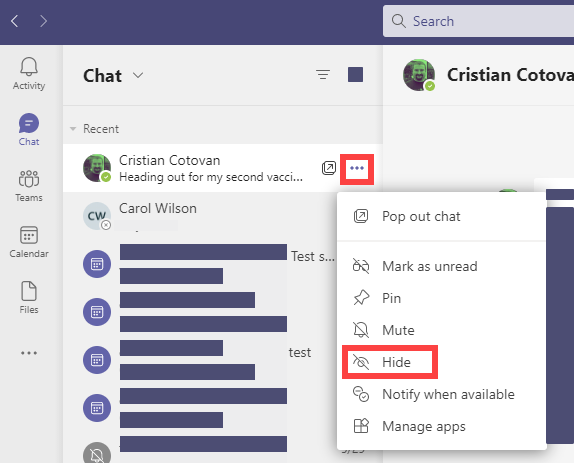
**Teams - Hide Chat**
Hide a chat
1. Select **Chat** in the navigation pane. 2. Select **More options**\- the three dots 3. Select **Hide**.
Unhide a chat
Need to see a hidden chat again?
1. Start a chat with the person again. 2. Click **More options** \- the three dots. 3. Click **Unhide** or type something in the message box.
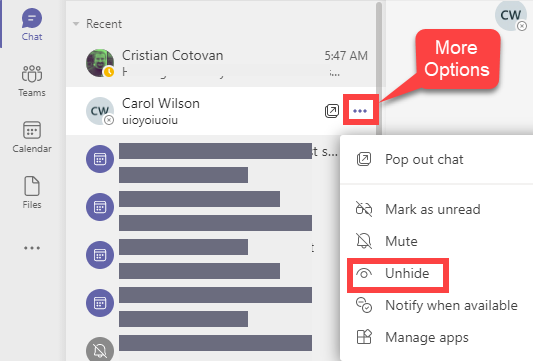
**Teams Chat - unhide a chat message**
YouTube video
Teams chats: 3 things you need to know - hide chats, delete messages and organize your chats
Delete a Teams chat message
You can't delete the entire chat message, but you can delete a message you sent.
To delete a sent chat message:
1. Cick the message you sent. 2. Click **More options** 3. Click **Delete**
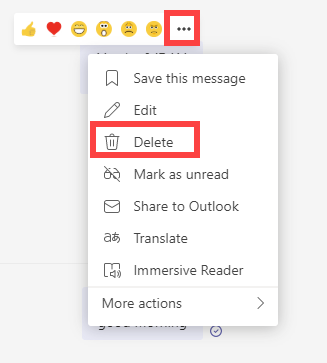
**Teams delete a chat message**
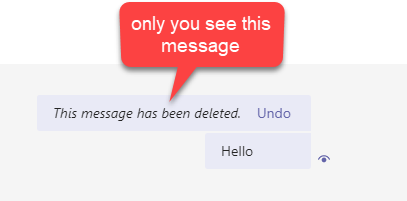
**Only you see the delete message**
Pin a chat
You can pin frequent conversations to the top of your chat list.
1. Select **Chat** 2. Find the name of the conversation you want to pin. 3. Click **More options**, then **Pin**. 4. This ensures that the chat stays at the top of your list. If you change your mind, just select it again and unpin it.
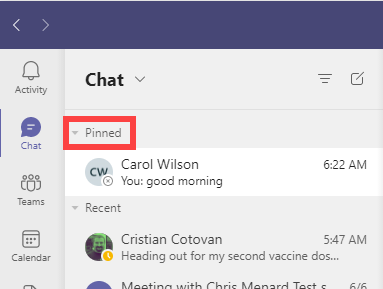
**Pinned chats stay at the top of your chat list**



