Microsoft Copilot Just Completely Changed: Home, Chat, Cowork, Code, USL & UBB Explained
Microsoft Copilot has a new look with Home and Code tabs, plus Chat and Cowork inside Home. Learn the important difference between USL (User Subscription License) and UBB (Usage-Based Billing), and why seeing Cowork or Code doesn't necessarily mean the usage is included in your subscription.


Microsoft Copilot looks very different in my tenant today.
Over the weekend, I noticed a significant change to the Copilot interface. What caught my attention first was the upper-left corner of the Copilot app.
I now have two primary tabs:
- Home
- Code
But this isn't simply a cosmetic update. The new layout highlights an increasingly important distinction in Microsoft Copilot: what is included with your user subscription and what requires usage-based billing.
If you're a Microsoft 365 administrator, trainer, or Copilot user, there are two acronyms you're going to want to know:
USL and UBB.
The New Microsoft Copilot Home and Code Tabs
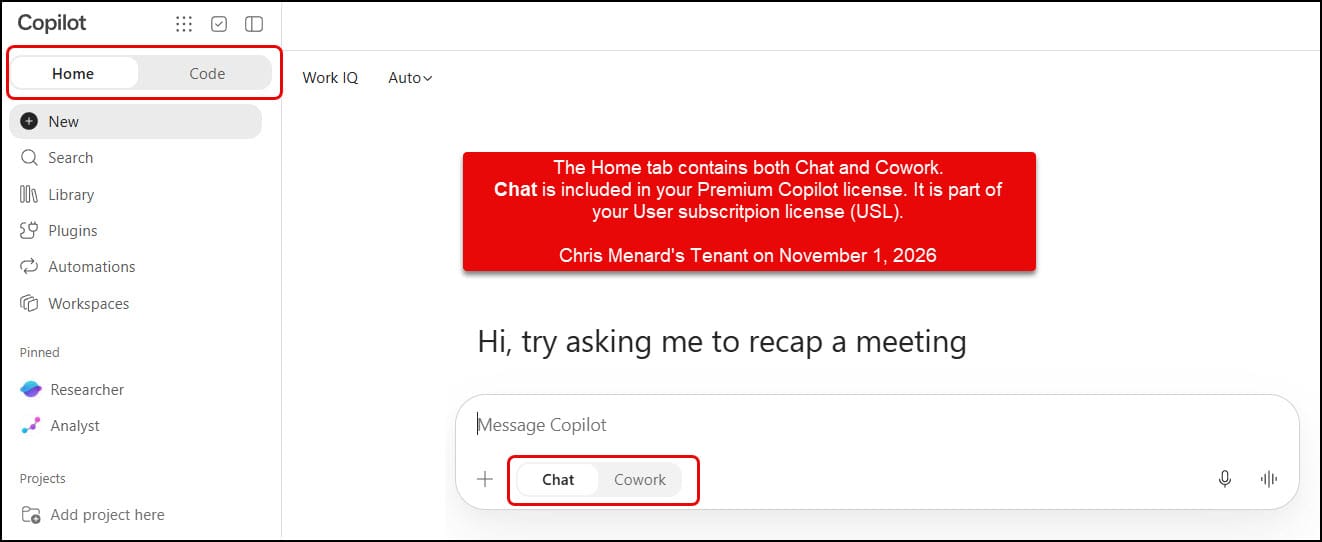
In my Microsoft Copilot tenant, the upper-left corner now displays Home and Code.
The Home experience brings together Chat and Cowork, while Code has its own separate tab.
Microsoft describes Home as the starting point where Chat and Cowork come together. Microsoft describes Code as a capability for building software from natural-language descriptions. [blogs.microsoft.com], [learn.microsoft.com]
What makes this especially important is that these experiences don't all use the same billing model.
USL: User Subscription License
USL stands for User Subscription License.
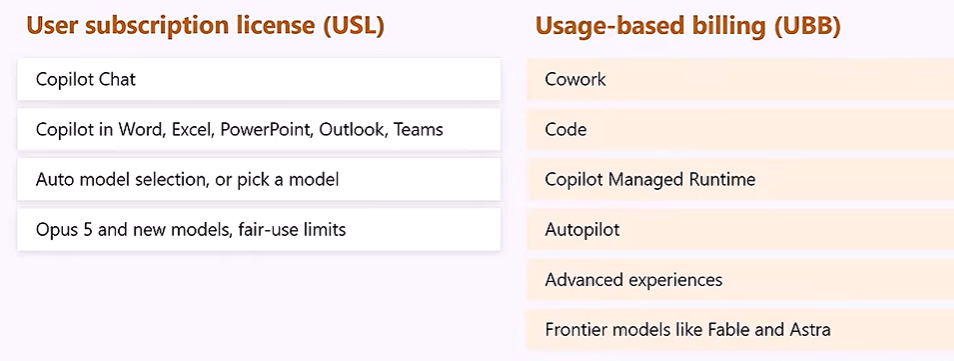
Microsoft describes USL as the fixed-price foundation for "everyday AI" work. That includes common productivity scenarios such as summarizing meetings, drafting documents, and performing analysis.
In practical terms, Copilot Chat is part of the USL side of the equation.
Microsoft also says the USL includes capabilities such as Auto model selection and access to certain models, subject to the applicable limits.
But then we get to the other side of the equation.
UBB: Usage-Based Billing
UBB stands for Usage-Based Billing.
This is where understanding the new Copilot experience becomes especially important.
Microsoft says UBB is intended for advanced AI and agentic work that can require more time, compute, or specialized frontier models. UBB uses Copilot Credits for eligible services.
Two of the experiences Microsoft's documentation specifically places under UBB are:
- Cowork
- Code
Microsoft also lists other advanced experiences under usage-based billing, including Copilot Managed Runtime and advanced work in SharePoint and OneDrive.
Cowork Is Inside Home, But It's UBB
Here's where the interface can initially be a little confusing.
Under Home, I can switch between Chat and Cowork.
They may appear side by side in the interface, but their billing models differ.
Chat = USL
Cowork = UBB
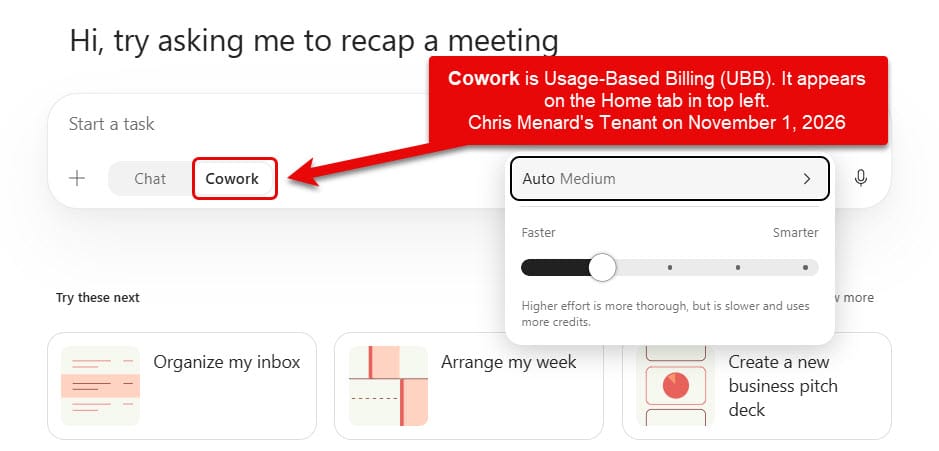
Cowork is designed for more advanced agentic work. Microsoft specifically categorizes Cowork as a UBB experience.
That distinction matters.
Code Also Uses Usage-Based Billing
Code is even more visually distinct because it has its own Code tab next to Home.
Microsoft describes the Code tab as an experience where you can describe the outcome you want, and Copilot can build working software, including apps, dashboards, internal tools, static websites, data transformations, automations, and scripts.
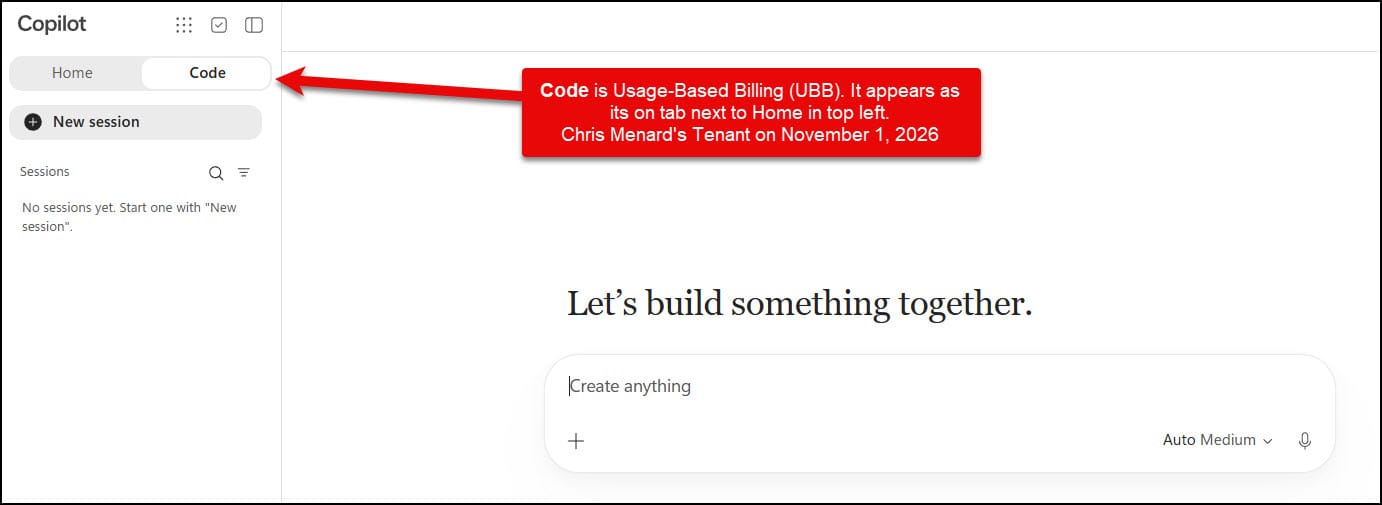
But just like Cowork:
Code = UBB
According to Microsoft, Code is one of the services managed through usage-based billing and requires a Copilot license.
Seeing Cowork or Code Doesn't Mean the Usage Is Included
This may be the most important takeaway.
Just because Cowork or Code appears in Microsoft Copilot does not mean its usage is simply included with your existing subscription.
Microsoft's documentation states that UBB experiences consume Copilot Credits and require a USL for access. Administrators can establish spending policies to control access and spending for supported UBB services.
Microsoft provides different billing options for supported services, including pay-as-you-go and other Copilot Credit purchasing arrangements.
For administrators, Microsoft provides Cost Management in the Microsoft 365 admin center for configuring usage-based billing, spending policies, limits, and alerts.
So a simple way to think about what I'm showing in these screenshots is:
Everyday AI
USL: User Subscription License
Examples include:
- Copilot Chat
- Everyday Copilot productivity experiences
- Auto model selection
- Included model usage, subject to Microsoft's applicable limits
Advanced AI
UBB: Usage-Based Billing
Examples include:
- Cowork
- Code
- Other supported advanced and agentic AI experiences
UBB usage consumes Copilot Credits.
Why I Think This Change Is Important
For me, this isn't just about Microsoft moving some buttons around.
The new interface makes the distinction between different types of Copilot work much more visible.
You can start in Home, use Chat for everyday Copilot work, move into Cowork for more advanced agentic work, or switch over to Code for building solutions.
At the same time, administrators and users need to understand how those experiences are funded.
That's why I think USL vs. UBB will become increasingly important terminology for anyone teaching, administering, or using Microsoft Copilot.
The screenshots in this article are from my Microsoft Copilot tenant on November 1, 2026. Because Microsoft is actively developing and rolling out these experiences, what you see in your tenant may differ from what I'm showing here.
Bottom Line
If you remember only three things from this article, make them these:
Chat = USL
Cowork = UBB
Code = UBB
And most importantly:
Seeing an advanced Copilot experience doesn't necessarily mean its usage is included with your existing subscription.
For UBB experiences such as Cowork and Code, organizations need the appropriate usage-based billing setup and funding/spending policy.
Microsoft Copilot isn't just getting new capabilities.
The way we access, organize, and pay for those capabilities is changing too.