Saving Chats and Conversations in Microsoft Teams | 5 TIPS


Saving chats and channel conversations in Microsoft Teams helps you reference old discussions, go back to questions or things you want to remember from your conversations with your colleagues. In this video, I provide 5 tips that will help you find your way around the Saved messages functionality in Teams.
We look at saving a chat message, saving a conversation from a Team channel, see where the saved chats and conversations go - it's not immediately obvious as Teams doesn't provide a visual cue when you save a chat message. We see where are all your Saved messages, all in one place.
I also go over how to unsave a chat or conversation and finally, how to reply to an old chat message, so that your colleagues know what you're talking about if you reply to an older message.
YouTube Video
Saving Chats and Conversations in Microsoft Teams | 5 TIPS
Chapters:
- 00:00 Introduction - 00:45 Save chats - 01:16 Save channel conversation - 01:54 Retrieve saved chats and conversations - 02:24 Unsave chats and conversations - 02:36 Reply to older chats - 03:29 Closing remarks
Save Chats and Channel Conservations
To save a chat or channel conversation, click **More Options** \- the three dots - and select **Save this message**.
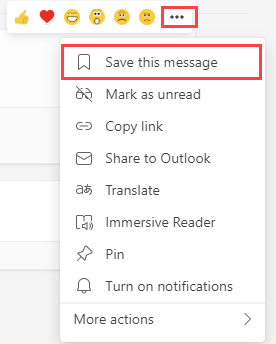
**Teams Save this message**
View Saved Chats or Channel Conversations
To see your saved items, click your **profile picture** or initials in the top right and select **Saved**. After clicking Saved, your messages will appear on the left-hand side of the screen. Clicking a message will display that message.
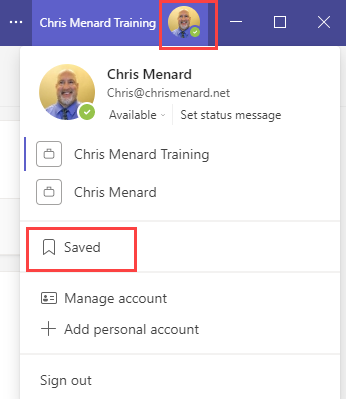
**View Saved Messages**
Unsave a message
To unsave a message, click the **bookmark icon** by the message.