
Teams - How to Manage Files and Folders in a Channel


Microsoft Teams Channels is a great way to communicate and collaborate. I love group chat also, but one HUGE advantage a Team has over a group chat is the ability to manage files and folders.
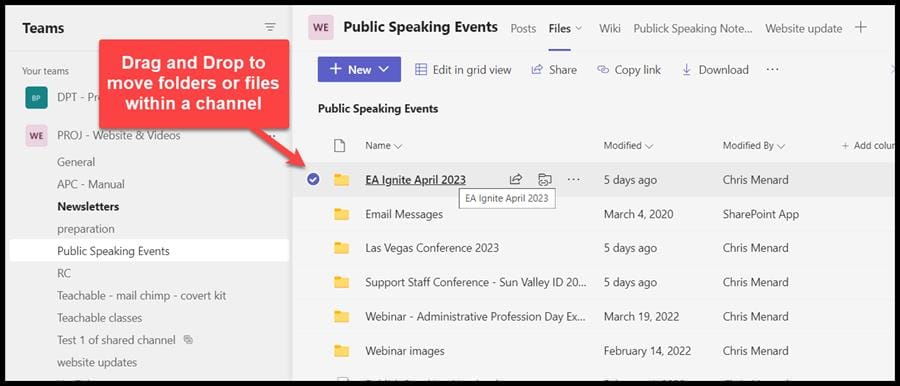
**Teams Channel - Drag and Drop to move files or folders in a channel**
With a group chat, you can't create folders. We will be in a Channel and examine how to create folders and files and move folders and files. We will also show how to move folders or files from one Channel to another Channel. Remember, files in a chat and group chat are stored in OneDrive, and files and folders in a Team are stored in SharePoint.
YouTube Video
Teams - How to Manage Files and Folders in a Channel
Video Chapters
- 0:00 Intro - 0:24 Chat vs. Teams Channel file location - 0:50 Folder and Files in a Channel - 1:13 Moving Files and Folders - 2:00 Move from one Channel to another Channel - 3:14 Closing Remarks
How do I move a file or folder inside a Teams channel?
Just drag and drop the file or folder.
How do I move a file or folder from one channel to another channel?
1. Right-click the file or folder. 2. Click **Move to.** 3. Pick the Team and Channel to move the file or folder to. 4. Click **Move here**.
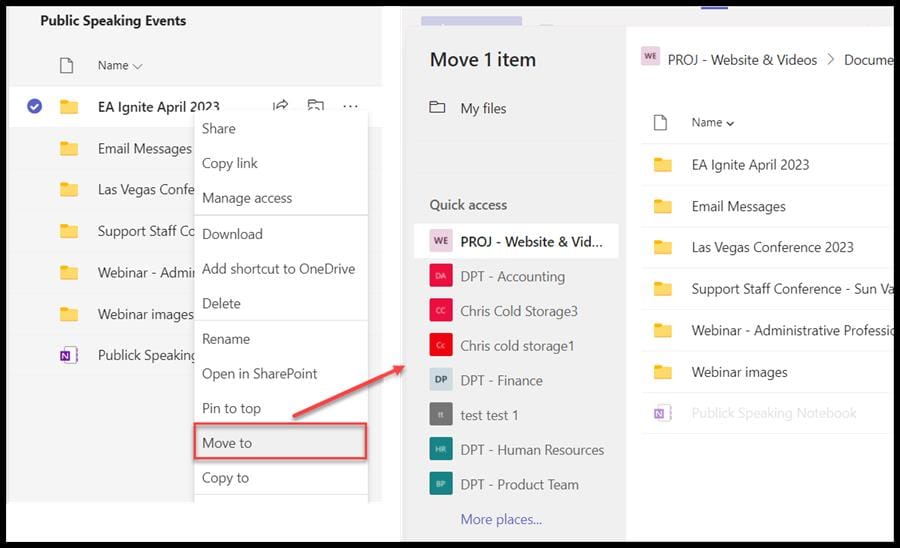
Move a file or folder to another Teams channel



