
Teams - Delete an Entire Chat

It is finally here! You can delete an entire chat in Microsoft Teams!!! Teams users can delete an entire one-on-one chat or group chat. Delete the chat will not delete the chat for other users. This feature is rolling out to General Availability in December 2022. Feature ID is 90723 and was added to the Teams roadmap on 11/9/2022. Platforms are Desktop and Mac.
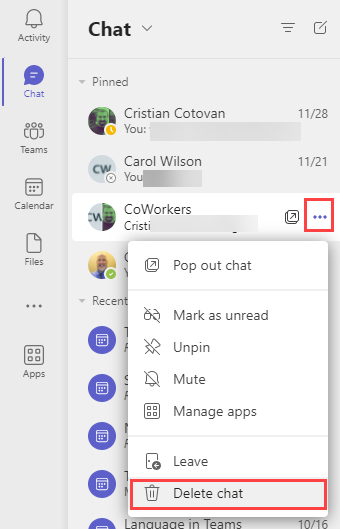
**Teams - Delete Chat**
YouTube video will be published on December 5, 2022
Teams - Delete entire chat - New Feature December 2022
Chapters:
- 0:00 Intro - 0:18 Five items - 0:42 When does this come out? - 1:12 Delete chat - 1:52 What can others still see? - 2:10 Delete a group chat? - 3:04 Deleting a meeting chat
Steps to Delete a Chat in Teams
1. Click **Chat** in the navigation bar on the left. 2. Click **More options** (the three dots) for the chat you want to delete. It can be a one-on-one chat or group chat. 3. Click **Delete chat**. 4. When the confirmation box appears, click **Delete** to remove the chat. Note any files you shared or tasks will need to be deleted separately.
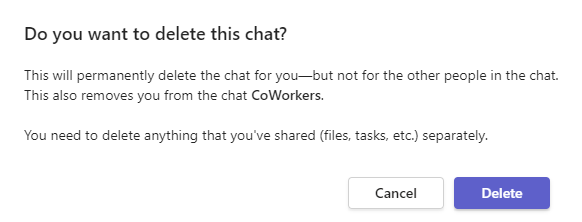
**Teams Delete chat confirmation box**
FAQ for deleting an entire chat in Teams
Here are some answers to some frequently asked questions regarding deleting an entire chat in Teams.
Can I delete the entire chat?
Yes - for both one-on-one and group chats.
If I delete the entire chat, does that delete it for other people in the chat?
No. Only for you. The other people can still view the entire chat.
When does deleting the entire chat come out?
December 2022, according to Microsoft.



