
Teams - Change your status in Teams | Duration and Status Message

Teams will indicate your status. This is very handy if you want to let coworkers and people know when you’re busy, do not want to be disturbed, or are away from your desk. Teams will sometimes automatically set the status. If you are in a meeting, Teams will show you as busy. Start presenting in the meeting, and Teams will indicate you are presenting. You can explicitly set your status yourself, go to your profile at the top of Teams and select one from the list. We will also look at using the duration feature and setting a status message.
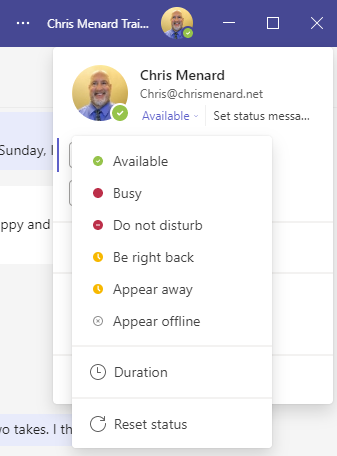
**Teams Status**
YouTube Video
Teams - Change your status in Teams | Duration and Status Message
Chapters:
- 0:00 Intro - 0:37 Status - 1:25 Override Status - 1:52 Do Not Disturb (DND) Status - 2:38 Reset Status - 3:00 Duration Feature - 3:52 Set Status Message - 5:50 Command Bar|



