
Microsoft Teams Improved Screen Sharing Interface | May 2021 Update


Posted on: 05/21/2021
**Microsoft Teams has a new feature in May 2021 update that I love. This has to do with sharing your screen, whether you're in a video call or in a meeting. Screen sharing is now much easier, particularly the part where you select the sharing source.**
I noticed this last week in my tenant, and I noticed it yesterday in another tenant. So this should be rolled out to you if you don't have it yet, please go and do an update on Teams from the account icon on the top-right corner, and choose _Check for updates_.
One little note I want to mention is, when you're in a chat, it is called a video call, which is right in the top-right corner of the screen. You won't have the whiteboard, but everything else works the same. If you're in a meeting, which you can see here from calendar, there's an instant meeting versus a scheduled meeting, which is new meeting.
You can see if you have this new feature by just starting a meeting, it even works if it's just you in the meeting. Then go to the top and choose 'Screen sharing':

During a meeting or call, **start screen sharing** from the top-right corner
Before this update, this window used to run across the bottom of the screen, from left to right:

The **old sharing tray** in Microsoft Teams before the May 2021 update
If you had two monitors, it would say screen one, screen two, but would also show you all your windows at one time. And I found that people always had a hard time figuring out what to share. It took significant intellectual effort to figure out what sources you were seeing in front of you and select the appropriate one.
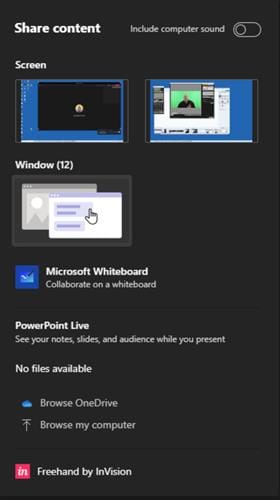
The new sharing tray in Microsoft Teams show collapsed windows and better sharing selection
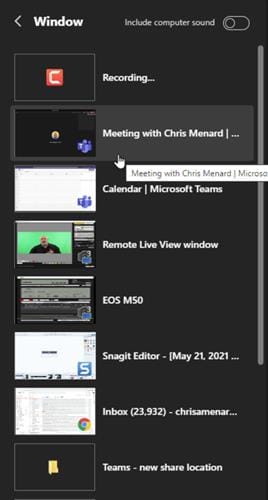
Selecting sharing from the **list of open windows** is now much more straightforward
So now, as you can see, I have two monitors, there's screen, one, there's screen, two. I have 12 windows open, which used to show all 12 at the bottom. Now they're collapsed. If I click and need to share just a window, I expand the windows group, I can go find the window I want to share. So that's a cool feature that it's collapsed.
It's just a much nicer layout, there's whiteboard (if you're in a meeting), you have the PowerPoint presentations you can share. If you don't see the PowerPoint you want, you can go browse OneDrive or you can browse your computer.
And one more tip for you: If you know you're sharing and are going to share possibly a YouTube video, you have to make sure you include computer sound, so everyone else in the meeting can hear what's being played in the YouTube video.
Microsoft Teams new sharing experience for Meetings and Video Chat - May 2021



