
How to use the TODAY function in Excel


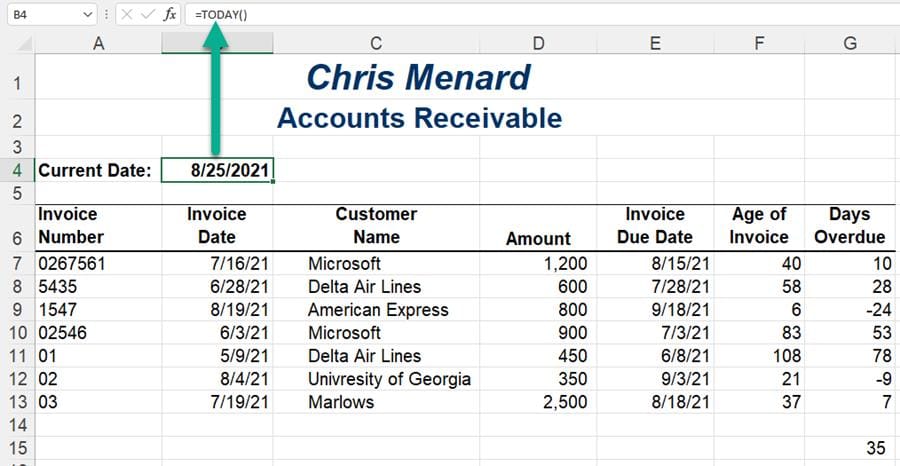
The **TODAY** function returns the current date and is updated automatically when you open an Excel file. The TODAY function has no arguments. I'll use the TODAY function in an accounting exercise using Accounts Receivable in this blog post and video. You would use the same for Accounts Payable. I'll also demonstrate Absolute reference with Net 30 terms and the AVERAGEIF function. You would also use the TODAY function for HR to keep up with years of service for employees.
In the screenshot below, the date is August 25. If I open this on September 4, cell B4 will automatically update to 9/4/2021, and the formuls will be correct.
**How to use the TODAY function in Excel**
YouTube video
How to use the TODAY function in Excel
Video chapters
- 0:00 Intro - 0:30 Net 30 days - 0:55 TODAY w/ Absolute ref - 1:40 Days overdue - 2:25 AVERAGEIF Function
TODAY Function Systax and Examples
Syntax
=TODAY()
Arguments
The Today function has no arguments.
TODAY function examples
If today is 12/1/2021, the TODAY function will return the following results
| | | | — | — | | **FUNCTION** | **Result** | | =TODAY() | 12/1/2021 | | =TODAY()+4 | 12/5/2021 | | =TODAY()-1 | 11/30/2021 |





