
Excel - switch between relative, absolute, and mixed references


Excel has three cell references - Relative, Absolute, and Mixed. It is critical to understand when to use each reference in Excel.
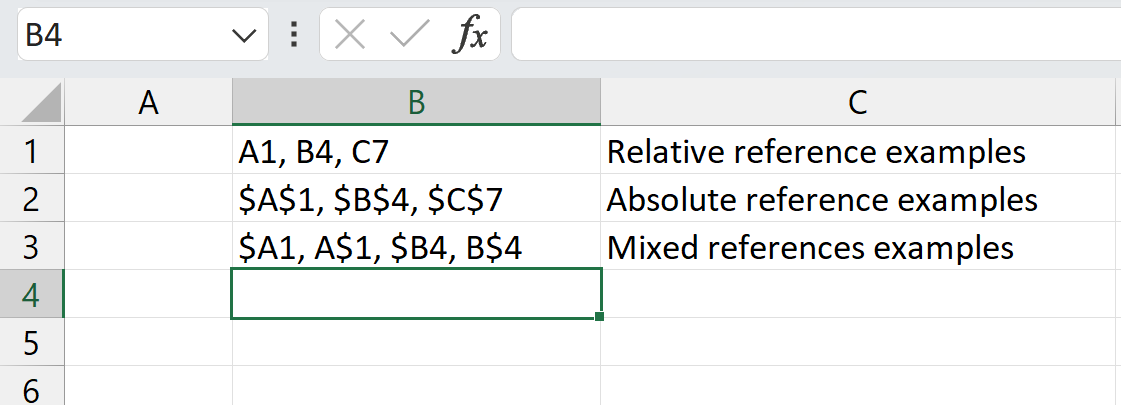
Excel References - Relative, Absolute, and Mixed
The default reference is relative is used frequently in Excel. The next highly used reference is absolute. Finally, we have two mixed references.
Relative references, the default reference with no dollar signs, change when a formula is copied to another cell. On the other hand, absolute references have two dollar signs and remain constant no matter where they are copied. An Absolute reference is usually easy to spot. It is a cell by itself with a number. Mixed references have one dollar sign. The dollar sign in front of the column freezes the column. The dollar sign in front of the row freezes the row.
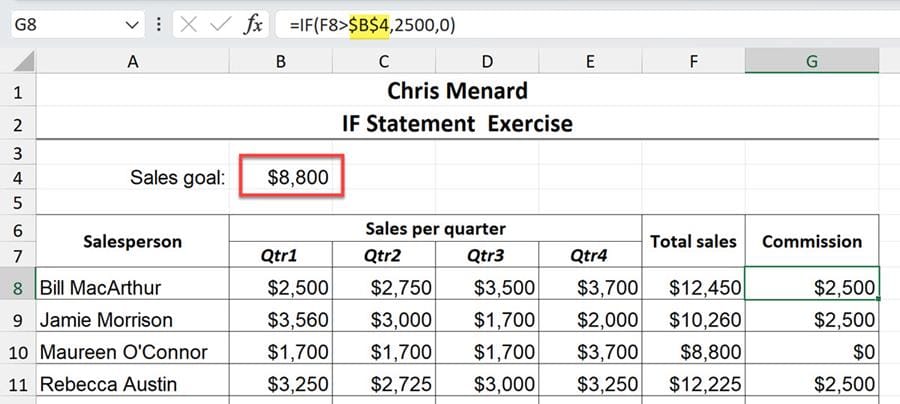
Absolute cell reference in cell G8. B4 is staying constant.
YouTube Video
Excel - switch between relative, absolute, and mixed references
Examples of References:
- A1, B2, C34, and Z90 are relative references - no dollar signs - $AS1, $C$7, and $R$8 are absolute references - two dollar signs - $A4, $C6, A$3, and E$8 are relative references - one dollar sign



