
Excel Highlight Every Nth Row with Conditional Formatting - Every 3rd, 4th, or 5th row. Chris Menard Training


Conditional Formatting in Excel allows you to highlight every 2nd, 3rd, 4th, or 5th row. Writing a formula using the MOD function and ROW function together allows us to do this.
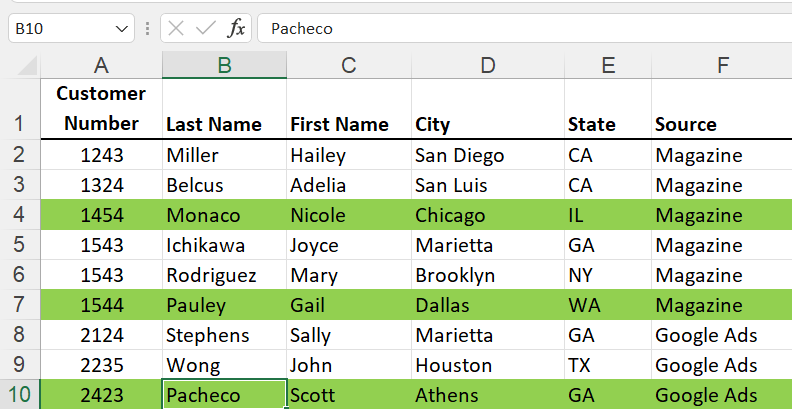
**Excel - Highlight every 3rd row**
The MOD Function has two required arguments and shows the remainder after dividing two numbers. For example, =MOD(7,3) will return 1. Three goes into 7 two times with a remainder of 1. Another example of MOD is =MOD(5,3) will return 2.
The ROW function specifics what row you are in. =ROW(), if you are in row 5, it will return 5. =ROW() will return 9 if you are in row 9.
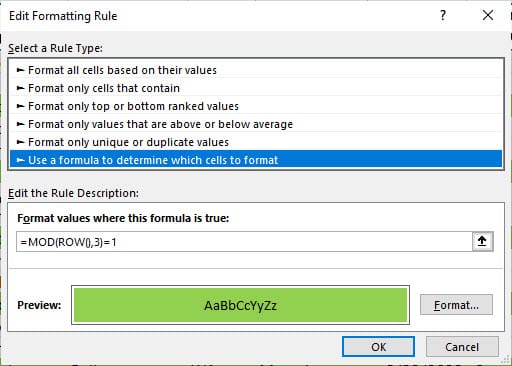
**Conditional Formatting with MOD and ROW function**
**Used to highlight every 3rd row**
YouTube Video
Excel Highlight Every Nth Row with Conditional Formatting - Every 3rd, 4th, or 5th row.
Chapters:
- 0:00 Intro - 0:28 Select quickly - 0:47 Examples of MOD and ROW with Conditional Formatting - 2:16 MOD and ROW Explained



