
Excel Functions for HR Professionals

Human Resource Professionals have a hectic schedule. They deal with benefits, training, staffing, retention, reviews, hiring, firing, personnel manuals, and many other HR aspects of their jobs.
I’ve put together a list of Excel functions every HR Professional should know. This list is not all inclusive but comes from questions asked to me by HR Professionals over the years.
Video on Excel HR Functions
Essential Excel Functions for the HR Professional Part 1
Video Bookmarks:
- 00:15 Today Function - 00:45 Datedif Function - 04:00 Networkdays Function - 06:10 Workday Function
Today Function
**=today()**
This is one of my favorite functions in Excel. The Today function calculates the current date from your computer and will update automatically. If today was October 15, 2017, the today function will return 11/3/2017. Tomorrow it will automatically update to 11/4/2017.
Examples of when to use today:
1. Calculate the ages of employees. 2. Calculate an employees length of service 3. Calculate days overdue when an HR form was supposed to be submitted.
DatedIf Function
**=datedif(start\_date, end\_date, Unit)**
Calculates the number of days, months, or years between two dates.
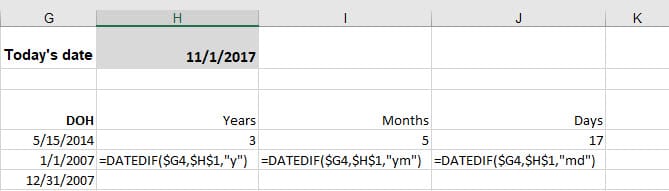
- Y is years - M is months - D is days - MD is days ignoring months and years - YM is months ignoring years - MD is days ignoring years and months



