COUNTIF Function in Excel

Share
COUNTIF Function in Excel

One of the most powerful functions in Excel is the COUNTIF function. The COUNTIF function in Excel counts the number of cells that meet criteria you specify. Several examples of when to use COUNTIF:

- How many employees work in the accounting department? - How many customers are in Georgia? - How many orders are over $500?

Syntax

=COUNTIF(Range, Criteria)

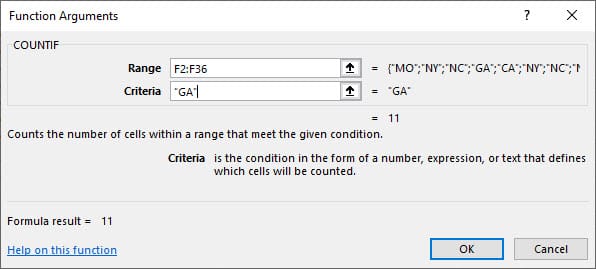
The COUNTIF function has two arguments. Both arguments, range & criteria, are required. The criteria can be text, numbers or dates.
Examples of COUNTIF![]

(https://menard-on-microsoft.ghost.io/content/images/2025/09/Countif_functions.jpg)

Excel file - COUNTIF

[Download the Excel file with answers](https://chrismenardtraining.com/_CMT/images/sections/posts/2018/11-2018/COUNTIF_Chris-Menard.xlsx)

The file above is used in the YouTube video.

COUNTIF Function in Excel for numbers, dates, and text by Chris Menard - YouTube

Read more

Copilot Skills in PowerPoint - Live Stream on October 20, 2026

Copilot Skills in PowerPoint - Live Stream on October 20, 2026

๐— ๐—ผ๐˜€๐˜ ๐—ฃ๐—ผ๐˜„๐—ฒ๐—ฟ๐—ฃ๐—ผ๐—ถ๐—ป๐˜ ๐˜‚๐˜€๐—ฒ๐—ฟ๐˜€ ๐—ธ๐—ป๐—ผ๐˜„ ๐—–๐—ผ๐—ฝ๐—ถ๐—น๐—ผ๐˜ ๐—ฐ๐—ฎ๐—ป ๐—ฐ๐—ฟ๐—ฒ๐—ฎ๐˜๐—ฒ ๐˜€๐—น๐—ถ๐—ฑ๐—ฒ๐˜€. ๐—™๐—ฎ๐—ฟ ๐—ณ๐—ฒ๐˜„๐—ฒ๐—ฟ ๐—ธ๐—ป๐—ผ๐˜„ ๐—ฎ๐—ฏ๐—ผ๐˜‚๐˜ ๐˜๐—ต๐—ฒ ๐Ÿด ๐—ฏ๐˜‚๐—ถ๐—น๐˜-๐—ถ๐—ป ๐—–๐—ผ๐—ฝ๐—ถ๐—น๐—ผ๐˜ ๐—ฆ๐—ธ๐—ถ๐—น๐—น๐˜€ ๐˜๐—ต๐—ฎ๐˜ ๐—ฐ๐—ฎ๐—ป ๐—ฐ๐—ผ๐—บ๐—ฝ๐—น๐—ฒ๐˜๐—ฒ๐—น๐˜† ๐—ฐ๐—ต๐—ฎ๐—ป๐—ด๐—ฒ ๐—ต๐—ผ๐˜„ ๐˜†๐—ผ๐˜‚ ๐—ฏ๐˜‚๐—ถ๐—น๐—ฑ, ๐—ถ๐—บ๐—ฝ๐—ฟ๐—ผ๐˜ƒ๐—ฒ, ๐—ฎ๐—ป๐—ฑ ๐—ฝ๐—ฟ๐—ฒ๐˜€๐—ฒ๐—ป๐˜ ๐—ฎ ๐—ฑ๐—ฒ๐—ฐ๐—ธ. Join me live on October 20, 2026, at Noon Eastern as I demonstrate each Copilot Skill and show practical ways to use them in your presentations. PDF of the 8 Copilot Skills in Pow

By Chris Menard