
Zoom - Blur your background - virtual background - New Feature


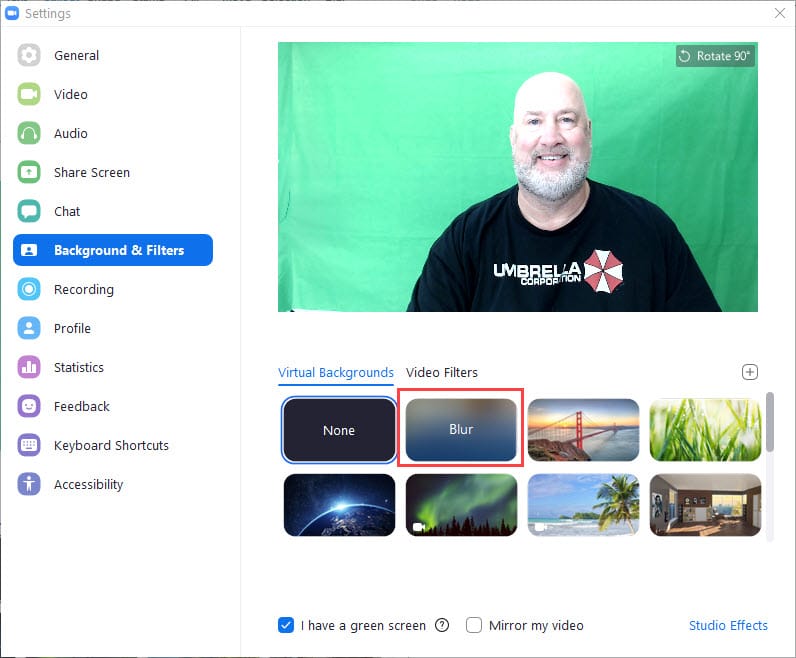
Zoom's latest update, 5.5.0, came out on February 1, 2021. One of the many new features is the ability to blur your background. You can still select a specific virtual background, but the blurred background is a great feature if you need added privacy.
YouTube video on Blur in Zoom
Zoom - Blur your background - virtual background - New Feature - YouTube
To turn on Blur background in Zoom
1. Be in a Zoom meeting 2. Click the **up arrow** next to stop video and select **Choose Virtual Background..**.
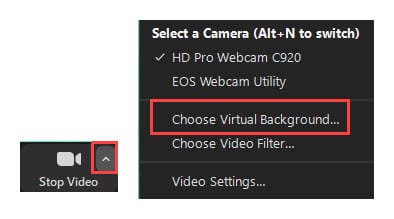
3. Click **Blur**
Video Chapters:
- 0:00 Intro - 0:40 Turn on Blur - 1:10 Zoom Resource Center
Zoom Resource Center
[https://chrismenardtraining.com/zoom/zoom-resource-center](https://chrismenardtraining.com/zoom/zoom-resource-center)
The Zoom Resource Center contains:
- Image backgrounds - free to download - Virtual video backgrounds - free to download - Zoom keyboard shortcuts for the Mac and PC



