
ZOOM : Basic vs. Pro Account - 7 Features you are missing

Zoom offers two types of accounts: Free accounts, which Zoom calls **Basic** accounts, and **Paid** accounts.
The Zoom Free account offers unlimited 1-on-1 meetings but only 40 minute limit on meetings with 3 or more people. You count as one of the people if you are the host, and you can still have an unlimited number of meeting up to 100 people, but the meeting will time out at 40 minutes with three or more.
There are several versions of the Paid account. There is **Pro**, and there are **Business** and **Enterprise** accounts that are paid accounts. It really comes down to Free vs. Paid for my comparison. You can check your account status and upgrade your License in your Zoom Account - **Profile.**

In this article, I'll show the 7 main features that the Basic account is missing when compared to the Paid account.
7 Zoom Features you are missing in your Basic Account.
**1. Changing Personal Meeting ID (PMI)**
With your Pro account, you can change your Personal Meeting ID called a PMI into almost any number. Your PMI can even be the phone number, as a lot of people do. With a Basic account, this is static, and the number cannot be changed.

**2. Polling**
Polling is a very handy feature in Zoom and is unavailable in the Basic account. Polling can be either true/false questions or multiple choice. You can launch polling questions if you are the Host or a Co-Host.
**3. Co-host**
A co-host can help you manage your large meetings. If you have a meeting with 60 people, for example, and you want some help with mute all participants and answering chat messages, co-hosts can help. You can have as many co-hosts in a Zoom meeting as you want with a paid account.
**4. Registration**
When you schedule a meeting with a paid account, you can have people register before the meeting. After they register, you can have them automatically or manually approved. They will receive the meeting link and can join in. In a basic account, the registration feature is missing.
You can watch a video I made about this Zoom Registration feature [here](
**5. Webinars**
With a paid account, you can schedule webinars for your participants, it does cost money to subscribe to the webinar feature, but it is a good asset missing in a basic account.
**6. Scheduling**
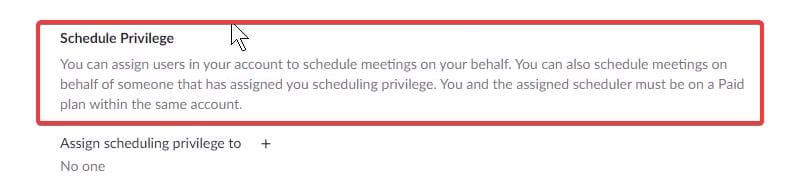
You can assign scheduling privileges to someone if you want them to set/schedule a meeting for you. You can also schedule meetings for someone else with a paid account, so this means both must own a paid account, and you have to both be on the same account.
In a paid account, this feature can be found in **Settings** - scroll down to **Schedule Privilege.**
**7. Reports**
You can find all sorts of reports for registration, polling, and attendance reports. Reports are located in **Account Management.** With a basic account, you do not have reports.
Zoom Basic / Free vs. Pro Account - seven features you are missing




