
Zoom Always Show Meeting Controls - Awesome Tip for Presenters: Chris Menard Training

When you are presenting in Zoom, it is important to have access to the Meeting Control bar. Frequently, it will disappear, and you have to Stop Presenting to get it back.
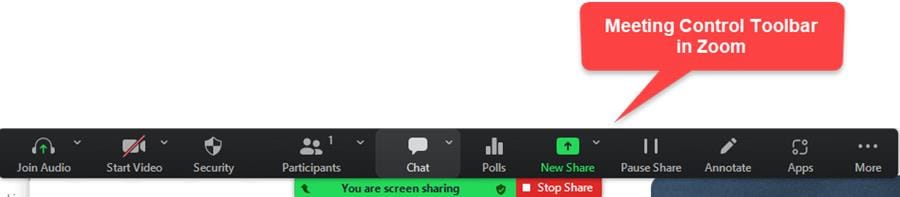
**Zoom Meeting Control Toolbar**
Some users have said they have to exit the meeting and join again. That is a HUGE hassle. My tip is to turn on the feature to Always Show Meeting Controls when presenting.
YouTube Video on Zoom - Always Show Meeting Controls
Zoom Always Show Meeting Controls - Awesome Tip for Presenters
Zoom - How to Enable Always Show Meeting Toolbar
1. Start the Zoom App 2. Click **Setting** 3. Make sure **General** is selected on the left side 4. Check **Always show meeting controls**
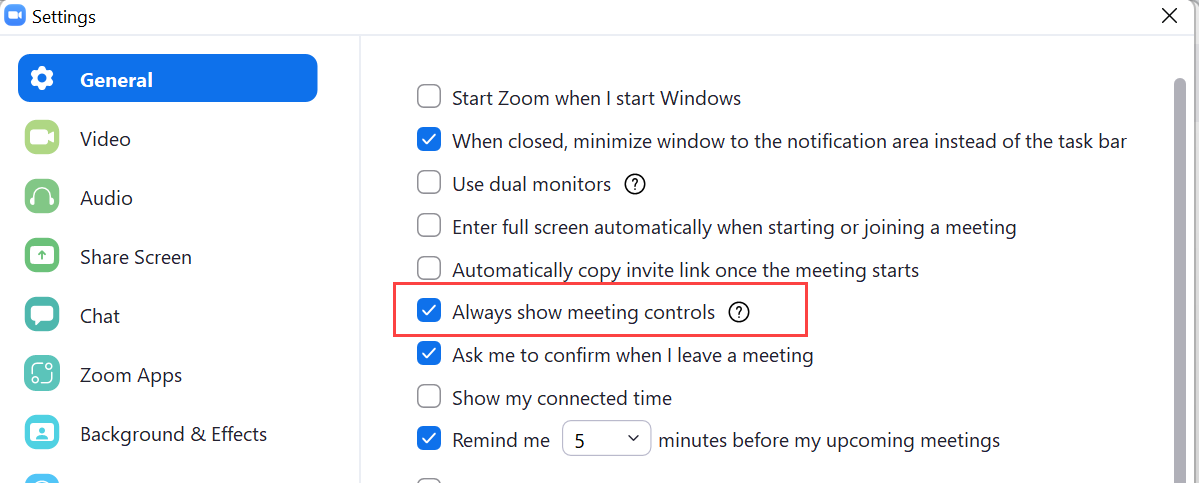
Zoom - Always Show Meeting Controls|



