
Zoom Advanced Polls - 6 new question types! New Feature


Zoom has a significant update for Meeting Polls. With Zoom 5.8.3, you can do **Advanced Polling**. There are six new question types in addition to single and multiple answers. You can now use
1. Short answer 2. Long answer 3. Matching 4. Rank order 5. Rating 6. Fill in the blank.
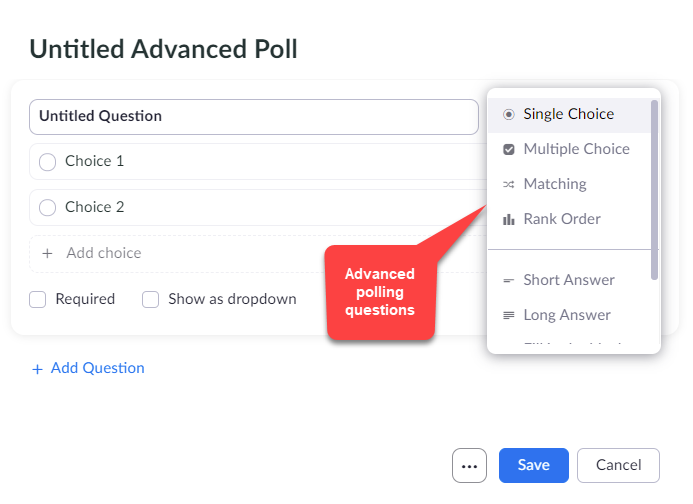
Zoom Advanced Polling - New Feature - November 2021
Another great feature is that you can add images to Poll questions! This is a HUGE update if you do polling in your meetings.
Important Notes:
- Polls only work with a licensed account. - You also must enable the Advanced Polling feature to use it. Enable Advanced Polling, sign into Zoom on the web, go to **Setting** and turn on **Allow host to create advanced polls and quizzes**. If you do CTRL + F and type poll, you will easily find advanced polling and enable it. - Everyone needs to be on the new update to see the advanced polling questions when the host launches a poll.
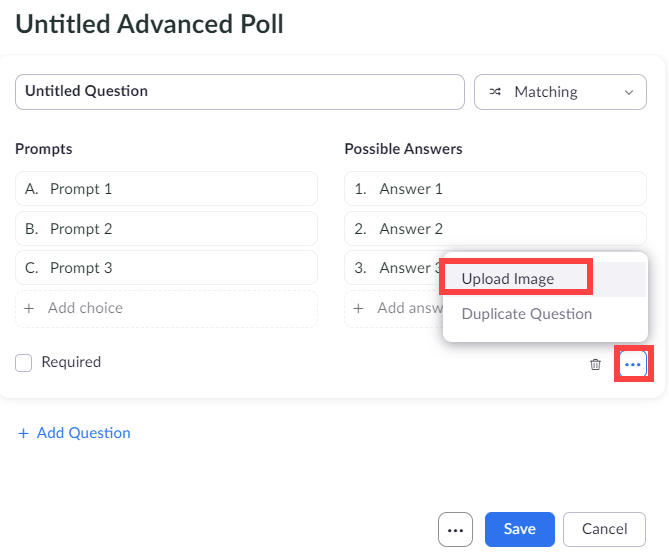
Add image to Zoom poll question
YouTube video
Zoom Advanced Polls - 6 new question types! New Feature | Nov 2021
Video Chapters / Timestamps
- 00:00 Introduction - 00:29 Requires licensed account - 00:44 Must be enabled in Settings - 00:57 Requires Zoom 5.8.3 - 01:22 All participants must update - 01:55 How to enable adv polling - 04:13 Creating polls - 05:41 Matching questions - 07:42 Rank order questions - 09:06 Short answer questions - 09:36 Long answer questions - 10:03 Fill in the blank question - 11:05 Ranking scale - 11:46 Closing remarks
Questions types that can be used in Quizzes
Of the eight question types only the following question types can be marked with a correct answer:
1. Single Choice 2. Multiple Choice 3. Matching 4. Rank Order
**Note**: Short answer and long answer questions will require manual scoring.




