
Word and Outlook: Dictate with Auto Punctuation and Voice Commands
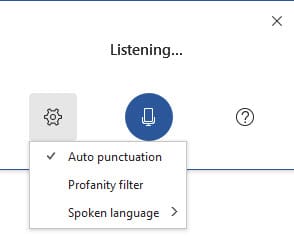
The Dictate feature in Word and Outlook has been greatly improved. Dictate will now allow Auto Punctuation, Voice Commands, and a Profanity Filter.

The Dictate feature in Word and Outlook has been greatly improved. Dictate will now allow Auto Punctuation, Voice Commands, and a Profanity Filter. The Dictate command works in the Desktop apps - Word, Outlook, and PowerPoint. Interestingly, the new improvements only work in Word and Outlook.
YouTube Video on Dicate in Word / Outlook Desktop
Word and Outlook - Dictate with Auto Punctuation and Voice Commands - YouTube
Turn on Dictate in Outlook (Microsoft 365 account)
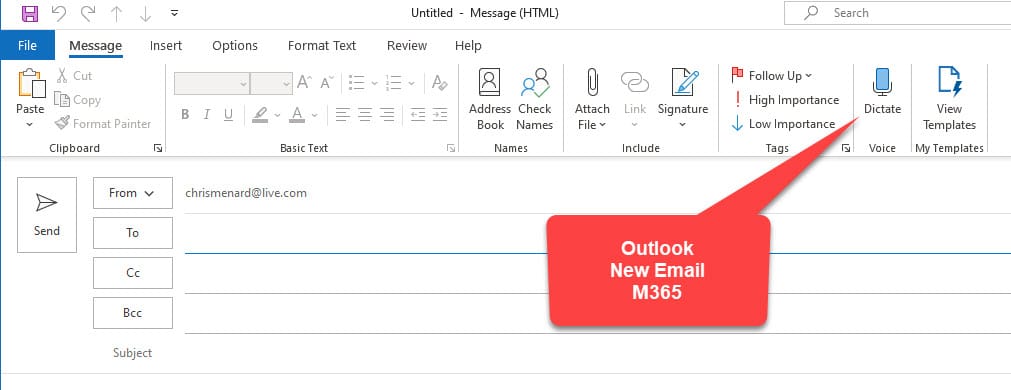
1. Start a New Email
2. On the Message tab, click Dictate
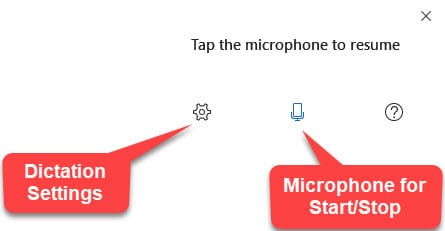
3. Click the Microphone to start or stop dictation.
4. Setting are in the Ger icon for Dictation Settings
Related articles
- [**8000 royalty-free images are available in Office 365 - April 2020 update**](https://chrismenardtraining.com/post/8000-royalty-free-images-office-365) Microsoft brings 8000 royalty-free images and icons to Office 365. These images work in Word, Excel, PowerPoint, and Outlook. Right now, these are only available to Office 365 Fast Insiders.
- [**Word - make headings 1 always show on a new page using Page break before setting**](https://chrismenardtraining.com/post/word-make-headings-1-always-show-on-a-new-page-using-page-break-before-setting) In a long Word document, it is often desirable to have Heading 1 styles show at the top of a new page and never have two headings 1 on the same page.
- [**Word and Outlook - Dictate with Auto Punctuation and Voice Commands**](https://chrismenardtraining.com/post/word--outlook-dictate-auto-punctuation-voice-commands) The Dictate feature in Word and Outlook has been greatly improved. Dictate will now allow Auto Punctuation, Voice Commands, and a Profanity Filter. The Dictate command works in the Desktop apps - Word, Outlook, and PowerPoint. Interestingly, the new improvements only work in Word and Outlook.
Turn on Dictate in Word (Microsoft 365 account)
1. On the Home tab, click Dictate
2. Click the Microphone to start or stop dictation.
3. Setting are in the Ger icon for Dictation Settings
See the screenshot above for Outlook



