
Using Array Formulas in Excel

An array formula is a formula that can perform multiple calculations on one or more of the items in an array. Array formulas can return either multiple results or a single result. Array functions keep your Excel file smaller in size.
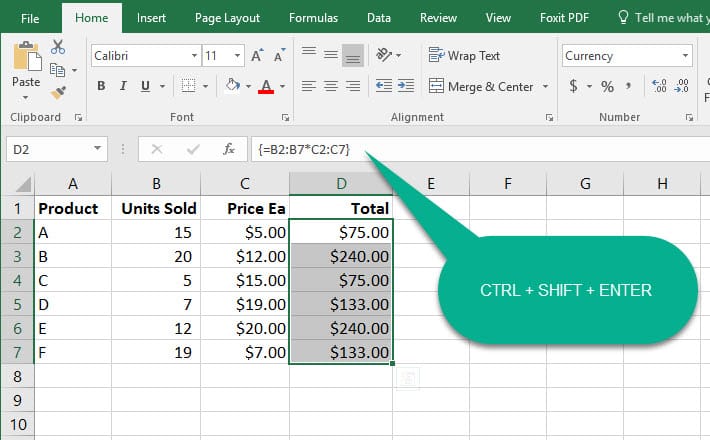
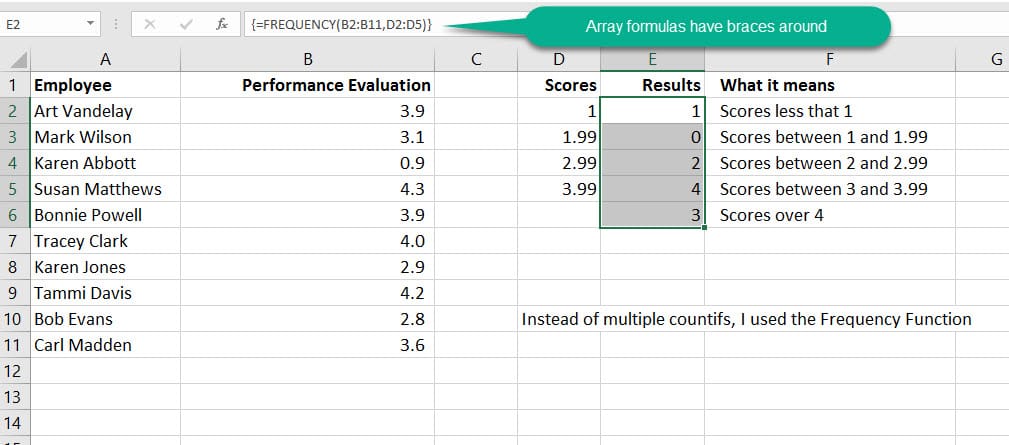
In general, array formulas use standard formula syntax. They all begin with an equal (=) sign, and you can use any of the built-in Excel functions in your array formulas. The key difference is that when using an array formula, you must press CTRL+SHIFT+ENTER to enter your formula. I use the Frequency function in Excel instead of multiple countif functions.
Screenshots of two array functions are shown below
Video of Array Functions by Chris Menard
Excel - Getting started with Array functions by Chris Menard - YouTube



