The Rule of 72 explained using Excel and the NPER Function


Need to know when your investment will double? In finance, the rule of 72 is an easy method for determining when an investment will double. Take the number 72 and divide it by the interest rate, which gives you the number of years. For example, a 5,000 investment at 8% interest will double to $10,000 in 9 years according to the rule of 72. Take 72 and divide by 8 (interest rate), and you end up with 9 years. You can even go the other route. If you want your money to double in 9 years, what interest rate do you need to have? 72 divided by 9 equals 8%.
Rule: The Rule of 72. Take 72, divide by interest rate, and that is how many years before your investment doubles.
Examples of the rule of 72
The 6, 8, and 10 referenced below are annual interest rates.
- 72 divided by 6 = 12 years - 72 divided by 8 = 9 years - 72 divided by 10 = 7.2 years
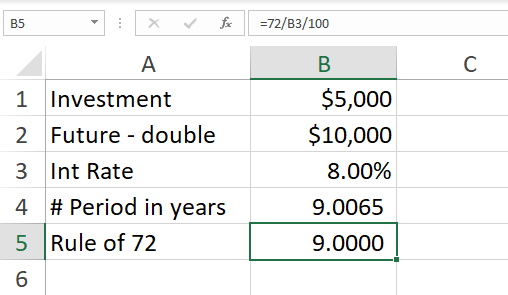
The Rule of 72. Take 72 and divide by interest rate, and that is years before your money doubles.
YouTube video
The Rule of 72 explained using Excel and the NPER Function
Video Chapters:
- 0:00 Intro - 0:40 Rule of 72 - 1:30 NPER function - 2:20 Rule of 72 in Excel - 4:10 Test doubling money - 5:18 Compare percentages
NPER Function has five arguments.
- rate - The interest rate per period. Example 8%. - pmt - The payment made each period. In my example, it is 0. - pv - The present value, or the total value of all payments now. In my example, it is -5000. You put in a negative number since it is money you put up. - fv - \[optional\] The future value, or a cash balance you want after the last payment is made. Defaults to 0. In my example, I used 10000. That is double the 5000. - type - \[optional\] When payments are due. 0 = end of period. 1 = beginning of period. Default is 0. I did not use this argument.
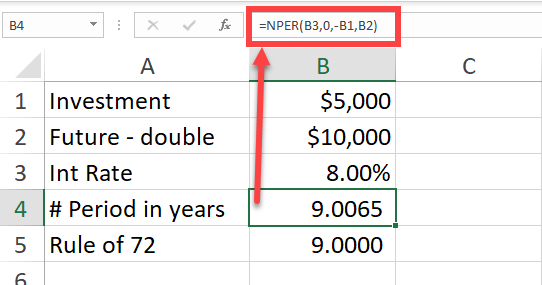
NPER Function in Excel compared to the Rule of 72
How accurate is the Rule of 72?
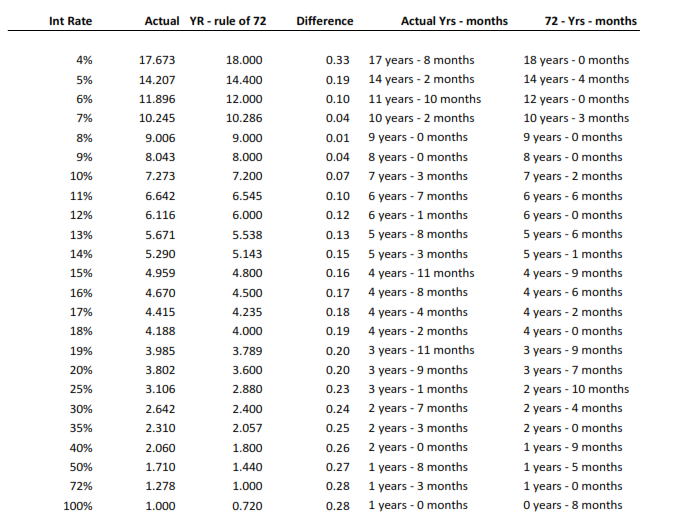
The Rule of 72 is highly accurate. I created a one-page pdf that shows the interest rates 4% to 20%, and then I started jumping in increments of 5%. I also included 72% and 100% I included 72% since 72 divided by 72 is 1. The issue is your money is not doubling at 72% in one year. That would be 100% to double in one year. Notice at 8%, we are 0.01 off. That is very accurate.
There are six columns in my pdf. The interest rate, the actual time using NPER. The third column in the Rule of 72. The fourth column in the difference. The fifth column in the actual rate (column 2) in years and months, and the last column in the Rule of 72 in years and months.
Click the image below to download the one-page PDF File or click **[**here**](https://chrismenardtraining.com/Files/DownloadFile.aspx?FUID=059f08ef-d5e1-4b40-97f7-7939af79d899)**.