
Tax Brackets Explained using Excel's XLOOKUP function

Tax brackets show you the tax rate you will pay on each portion of your income. There are seven tax brackets. The United States has a progressive tax system based on your Taxable income, not Gross income or Net Income. Your income is taxed at different rates with a progressive tax system. The more you make, the higher the rate for that bracket.
For example, if you are single in 2021, the lowest tax rate of 10% is applied to your income's first $9,950. The next portion of your income is then taxed at 12%, and then 22%.
Example of Progressive Tax System
If you are single in 2021, and your taxable income is 86,375, you would be taxed at the rates below.
- 10% for the first 9,950 = $950 in tax
- 12% for the next $30,575 = $3,669 in tax
- 22% for the next $45,850 = $10,087 in tax
Those three income numbers total $86,375 and the tax would be $14,751 (950+3,669+10,087). Notice the more you make the higher the tax rate percentage.
YouTube Video showing Tax Brackets with Excel's XLOOKUP function
Tax Brackets Explained using Excel's awesome XLOOKUP function - YouTube
Taxable Income
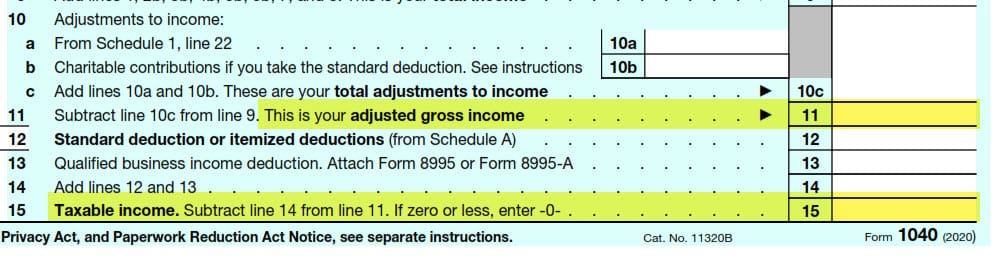
Taxable income is your Adjusted Gross Income (AGI) minus either the Standard deduction or itemized deductions. Screenshot of IRS Form 1040 for 2020 showing AGI and Taxable Income.
- AGI is line 11 - Taxable Income is line 15
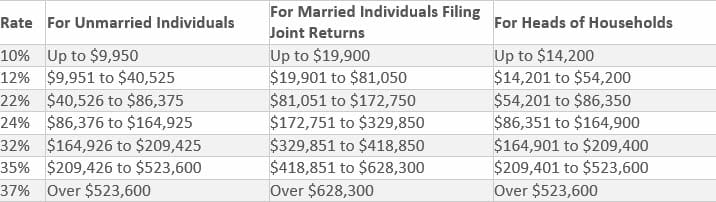
Seven tax brackets for 2021
For 2021, there are seven different tax brackets with tax rates of 10, 12, 22, 24, 32, 35, and 37 percent. The amount of tax you owe depends on both your taxable income and your filing status.
**Related articles**
- Annual Percentage Yield (APY) vs. Interest Rate
The annual percentage yield takes the interest rate and compounding periods to show what your money could earn in a year. The Future Value (FV) and EFFECT functions are shown. - XLOOKUP function in Excel
XLOOKUP is the latest function in Excel for Office 365. If you use VLOOKUP or INDEX/MATCH, you are going to love XLOOKUP.
Standard deductions for 2021
- Single and married filing separately $12,550
- Married filing jointly $25,100 - Head of household $18,800
Excel file for tax brackets and XLOOKUP
[https://chrismenardtraining.com/Files/DownloadFile.aspx?FUID=61e648db-569e-49c0-b330-f0e3bb16c7aa](https://chrismenardtraining.com/Files/DownloadFile.aspx?FUID=61e648db-569e-49c0-b330-f0e3bb16c7aa)
IRS Website with Tax Brackets and Standard Deductions for 2021
[https://www.irs.gov/newsroom/irs-provides-tax-inflation-adjustments-for-tax-year-2021](https://www.irs.gov/newsroom/irs-provides-tax-inflation-adjustments-for-tax-year-2021)
Learn Personal Finance with Microsoft Creators
[
[YouTube Video: https://www.youtube.com/playlist?list=PLXPr7gfUMmKw2RWTyxZzlv3Uf1viRq-1Y](https://www.youtube.com/playlist?list=PLXPr7gfUMmKw2RWTyxZzlv3Uf1viRq-1Y)]
**Related articles**
- [**Future Value Function in Excel**](https://chrismenardtraining.com/post/future-value-excel-simple-vs-compound-interest-explained) The Future Value Function will give you the answer to the future value on investment. Compound interest is interest on interest vs. simple interest that interest only on the principal.
- [**SUMIFS Function in Excel**](https://chrismenardtraining.com/post/sumifs-function--excel) The SUMIFS function will sum numbers based on one or more criteria. It is superior to the SUMIF function.
Microsoft Support - XLOOKUP webpage
[https://support.microsoft.com/en-us/office/xlookup-function-b7fd680e-6d10-43e6-84f9-88eae8bf5929](https://support.microsoft.com/en-us/office/xlookup-function-b7fd680e-6d10-43e6-84f9-88eae8bf5929)
Video Chapters
- 0:00 Intro - 1:17 Progressive tax system - 2:05 Tax Brackets and IRS webpage - 3:09 Formula to add tax - 3:35 Taxable income - 3:57 Standard deductions - 4:30 Manual calculate tax - 5:40 XLOOKUP for Tax - 10:40 Tax on extra money - 12:25 Marginal Tax Rate - 13:00 Effective Tax Rate



