
SUMIFS Function in Excel

The SumIfs Function is an awesome Excel function. It came out with Excel 2007. It is superior to the Sumif function. The Sumif function only allows one criterion. The Sumifs function allows 29 criteria. In this video I look at referencing cells with Sumifs, using operators with sumifs.
Examples of SUMIFS:
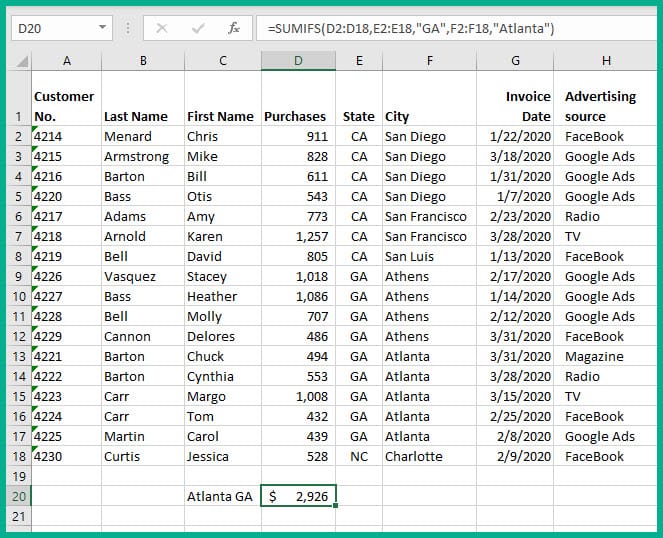
What are the purchases for Atlanta, GA?
States are listed in column E, Cities are listed in column F, and Purchase are shown in column D.
To find the total purchases by Atlanta GA use SUMIFS. The formula would be
=SUMIFS(D2:D18, E2:E18. "GA", F2:F18,"Atlanta, "Atlanta")
This would find purchases for Atlanta, GA customers. The SUMIFS function requires the purchases or values, followed by the criteria range and critera. The first criteria range is States with "GA" in quotes. The second criteria range is CITY with "Atlanta" in quotes.
YouTube Video on SUMIFS
The SUMIFS function in Excel is used to sum multiple criteria by Chris Menard



