
Self-select Breakout Rooms in Zoom


Zoom now allows participants to choose their own Breakout Rooms with no assistance from the host. This new feature in Zoom 5.3.0 will enable participants to self-select their own breakout rooms. This is a great feature. Imagine I have students in my Zoom meeting. I need the Accounting students to meet, the Marketing students to meet, and the Strategic Management students to meet. Instead of trying to put them in rooms myselft, I can ask them to go to their resepective rooms.
Both the host and participants need to be on Zoom 5.3.0 or higher.
To enable participants to choose their own breakout room
1. Start a Zoom meeting 2. Click **Breakout Rooms** 3. Select the number of breakout rooms 4. Select **Let participants choose rooms** 5. Click **Create**
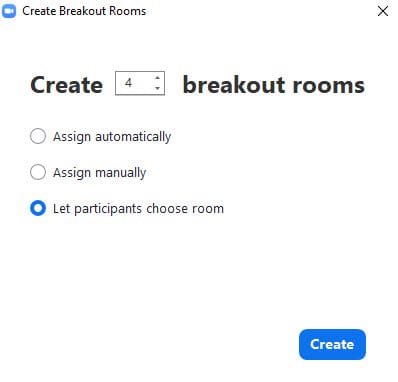
Breakout Room Options
If you make a mistake and forget to select "Let participants choose breakout rooms", you can enable it by doing the following in options:
1. Click **Options** 2. Check **Allow participants to choose rooms**
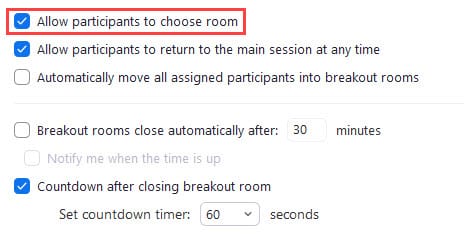
Other Options for Breakout Rooms
- You can allow participants to return to the main session at any time - Automatically move all assigned participants into breakout rooms - Set a time for Breakout rooms to close automatically - Use a countdown timer for closing the breakout rooms
Self-select Breakout Rooms in Zoom | Allow participants to choose breakout room



