
Revolutionizing Data Import with Copilot in Excel: A Game-Changer for External Data Integration


The latest rollout of Copilot in Excel brings an exciting new capability: the ability to effortlessly import data from various sources, including Word documents, PowerPoint files, PDFs, and external websites. This powerful feature promises to streamline your workflow and enhance your data analysis capabilities like never before.
The Power of Copilot Import External Data
Copilot's new import functionality is designed to make data gathering and integration a breeze. No more tedious copy-pasting or manual data entry - Copilot can now pull information directly from diverse sources with just a simple prompt. Let's dive into some real-world examples to showcase the impressive capabilities of this new feature.
YouTube Video - Pulling External Data into Excel with Copilot
Copilot in Excel: Import Data from Various Sources Easily - YouTube
Example 1: Pulling Population Data for U.S. States
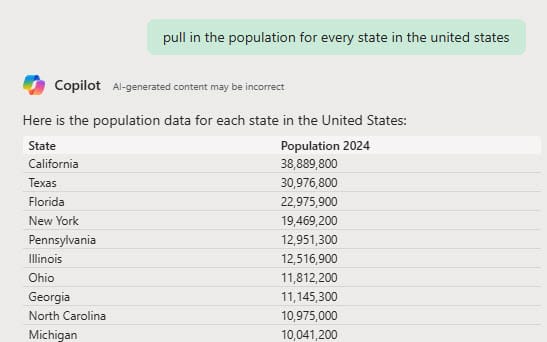
To demonstrate the ease and accuracy of Copilot's data import feature, I decided to test it with a common data request: population figures for all U.S. states. Here's how it went:
- I opened Excel with Copilot enabled.
- In the Copilot prompt box, I entered: "Pull the population for every state in the United States."
- Within seconds, Copilot presented a comprehensive list of all 50 states and their respective populations.
- The data was neatly organized, starting with California and continuing through all states.
- Copilot even provided three sources for the data, ensuring transparency and reliability.
To verify the accuracy, I inserted the data into a new sheet and cross-checked a few entries. California, Texas, and Florida all matched the figures from the cited source (worldpopulationreview.com). The speed and precision of this import were truly impressive.
Example 2: Super Bowl Matchups and Winners Since 1990
To further test Copilot's versatility, I pulled historical sports data - specifically, Super Bowl information. Here's what happened:
- I entered the prompt: "Show me all Super Bowl matchups and winners since 1990."
- Copilot quickly generated a new sheet with the requested information.
- The data included the year and teams, the scores, and the Roman numeral designation for each Super Bowl.
- The list started in 1990 and continued to the most recent Super Bowl, providing a comprehensive historical record.
This example showcases Copilot's ability to not only pull raw data but also to understand the context and provide additional relevant information (like scores and Roman numerals) without explicitly being asked.

The Impact of Copilot Import External Data on Productivity
The introduction of this feature marks a significant leap forward in Excel's capabilities. Here are some key benefits of using Copilot to import external data:
- Time-saving: What used to take hours of manual data entry or complex import processes can now be accomplished in seconds.
- Accuracy: By pulling data directly from reliable sources, Copilot reduces the risk of human error in data entry.
- Versatility: From population statistics to sports history, Copilot can handle a wide range of data types and sources.
- User-friendly: The natural language prompts make it easy for users of all skill levels to import complex datasets.
- Up-to-date information: Copilot pulls from current online sources, ensuring you're working with the latest data available.



