
PowerPoint Hide & Unhide slides now have different commands


In PowerPoint, it was unclear how to unhide a slide. Previously, when you wanted to hide a slide, you right-clicked the slide and selected Hide. But to unhide the slide, the command still showed Hide instead of Unhide. Now, the command for unhiding is correctly labeled Unhide Slide.
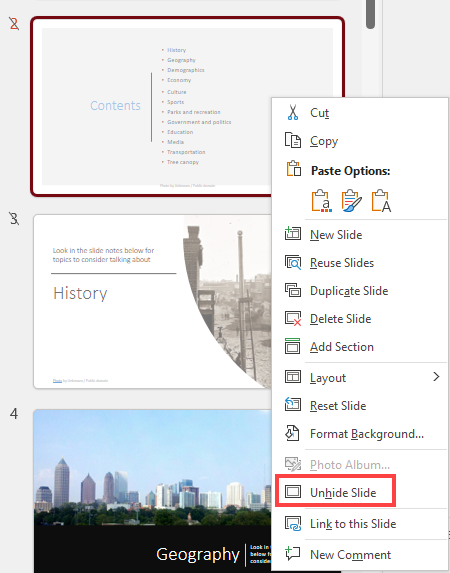
**PowerPoint Hide and Unhide slides**
YouTube video
PowerPoint Hide & Unhide slides now have different commands and Slideshow Tips
**Other PowerPoint Articles**
Hide and Unhide in the Slide Show tab
Hide and Unhide Slide can be done with a right-click on the slide, but the commands are also available on the Slide Show tab under the Set up group.
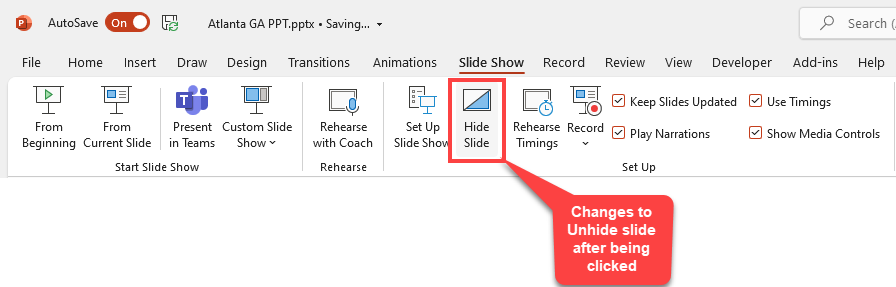
**PowerPoint - Slide Show tab - Hide & Unhide Slide**
Slide Show keyboard commands
- F5 to run the slideshow on slide 1 - Shift + F5 Run the slideshow from the current slide - CTRL + P Pen - CTRL + A Arrow - Type slide number and press Enter to go to a slide - ESC to get out of Slide Show



