
PowerPoint - Free Stock Videos from Microsoft now in PowerPoint


Microsoft 365 subscribers have access to Premium Creative Content, an in-app library of royalty-free images, icons, cutout people, stickers that are available in Word, PowerPoint, Outlook, and Excel. Now Microsoft has added Stock Videos for PowerPoint. The videos are subtle looping videos.
Steps to insert video into a PowerPoint deck:
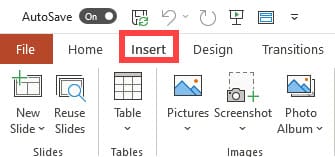
1. Click the Insert tab
2. Click Videos
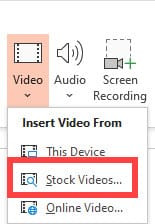
3. Click Stock Videos
Use Design Ideas in PowerPoint
1. To use Design Ideas, click **Design** 2. Then click **Design Ideas**

The first time you try out PowerPoint Designer, it may ask your permission to get design ideas for you. If you want to use Designer, select Turn on.
Availability of Stock videos in PowerPoint
Stock Videos is currently rolling out on PowerPoint Win32. Mac and Web are coming soon.
– Windows: Version 2012 (Build 13512.20000) or later.
_NOTE_: You’ll need to be a M365 Subscriber to access the full library of content. This feature is not available on Office Perpetual, namely Office 2019 or 2016.
YouTube video on Stock Videos in PowerPoint
PowerPoint - Free stock Videos from Microsoft available in PowerPoint
Video Chapters:
- 0:00 Intro - 0:45 Insert one video - 2:00 Design Ideas - 2:37 Insert multiple videos - 3:15 Four videos - Design Ideas



