
PowerPoint Edit Speaker Notes While in SLIDE SHOW


PowerPoint for Microsoft 365 allows you to edit your Speaker Notes while in PowerPoint Slide Show. Start your presentation and in Presenter View, you can edit your speaker notes.
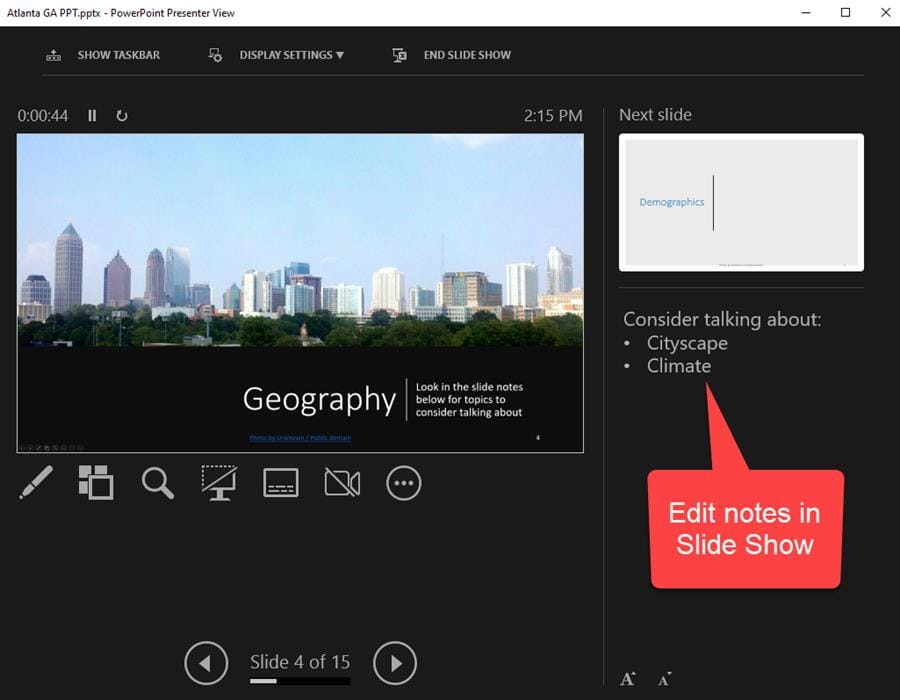
**Edit Speaker Notes while in PowerPoint slide show**
Keyboard shortcuts even work for Bold, Italics, and Underline. You can select text and pull up Font features - make text larger, smaller, and change color. This is a great new feature. Beta users have this now, but it will be out soon available for all Microsoft 365 users.
YouTube Video
PowerPoint Edit Speaker Notes While in SLIDE SHOW
PowerPoint keyboard shortcuts for Slide Show
- F5 - Start slide show from beginning - Shift + F5 - Slide show from the current slide - ALT + F5 Start the presentation in Presenter View - CTRL + H Hide the pointer and navigation buttons - B - Display a blank black slide - W - Display a blank white slide - Esc - End the slide show - Next slide - Page down or Enter - Previous slide - Page up



