
Microsoft Word's incredible Follow-up feature!


Have you ever been in a Word document and need to mark some sections for Follow-up? For example, a bulleted or numbered list where you need to come back and add some bullet points. Maybe you don't like the wording of a paragraph and want to follow-up on it later.
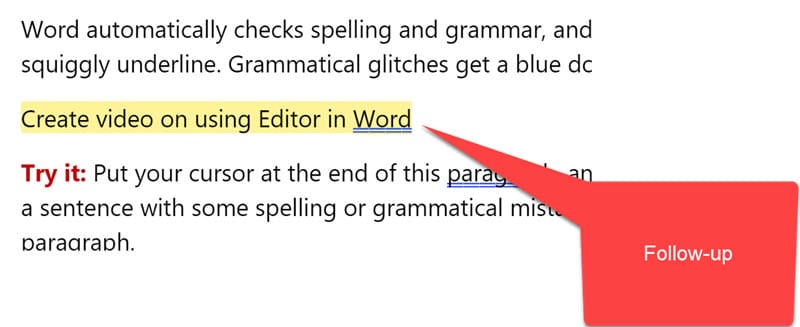
Microsoft **Word for the Web** now has you covered with this new, excellent follow-up feature. You can not only Mark items to follow up for yourself, but you can also use Word's at mentions for other people to follow-up. At Mentions are handy when you are sharing a Word document. Follow-ups show up in a yellow highlight.
Microsoft Word's incredible Follow-up feature!
Add a Follow-up
Try it!
1. Right-click where you want to add a Follow-up 2. Click **Follow-up** 3. Type in your message for the Follow-up 4. Press **Tab** on the keyboard.
The Follow-up will appear with a yellow highlight.
View all Follow-ups
Try it!
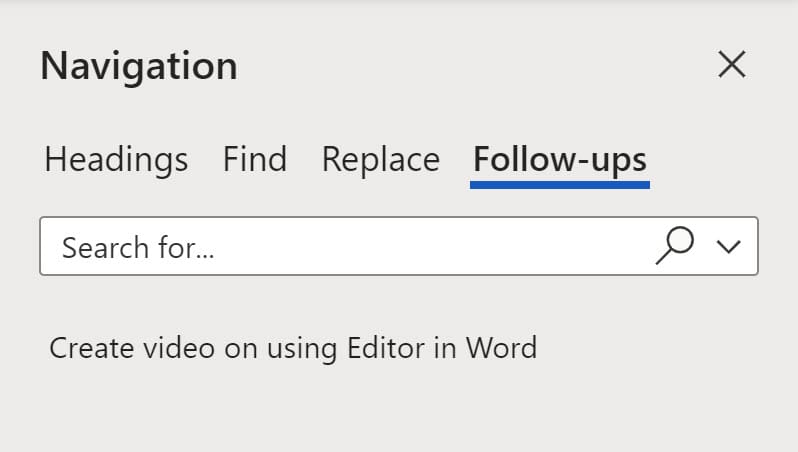
1. Select **View** tab 2. Click **Navigation** 3. Click **Follow-ups.** 4. Click a Follow-up to jump to that Follow-up
Resolve a Follow-up
Try it
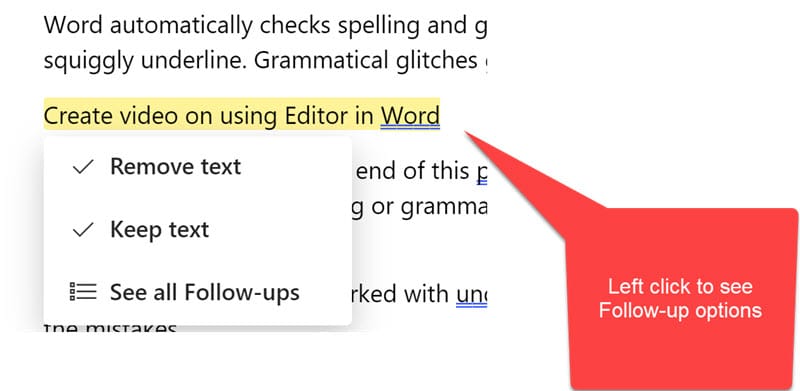
Left-click a Follow-up and you have three options
1. Remove text 2. Keep text 3. See all Follow-ups which opens the Navigation pane
At Mentions in Word
To add an @mention in Word type the @symbol and the person's name. They will get notified and if the document is not shared, it will be shared with them.
Note: This works with SharePoint Online.
Microsoft support site
[Word support article on Follow-ups](https://support.microsoft.com/en-us/office/stay-in-the-flow-with-follow-ups-and-mentions-698bba10-d03c-461c-9ea8-7635cccc4fbb#:~:text=To%20start%20a%20follow%2Dup,to%20start%20a%20follow%2Dup.)



