
Microsoft Forms - Share Responses for Surveys and Polls: Chris Menard Training


Microsoft Forms is easy to use for surveys and polls. One of my features is how Forms summarizes responses and shows Pie Charts and Graphs.
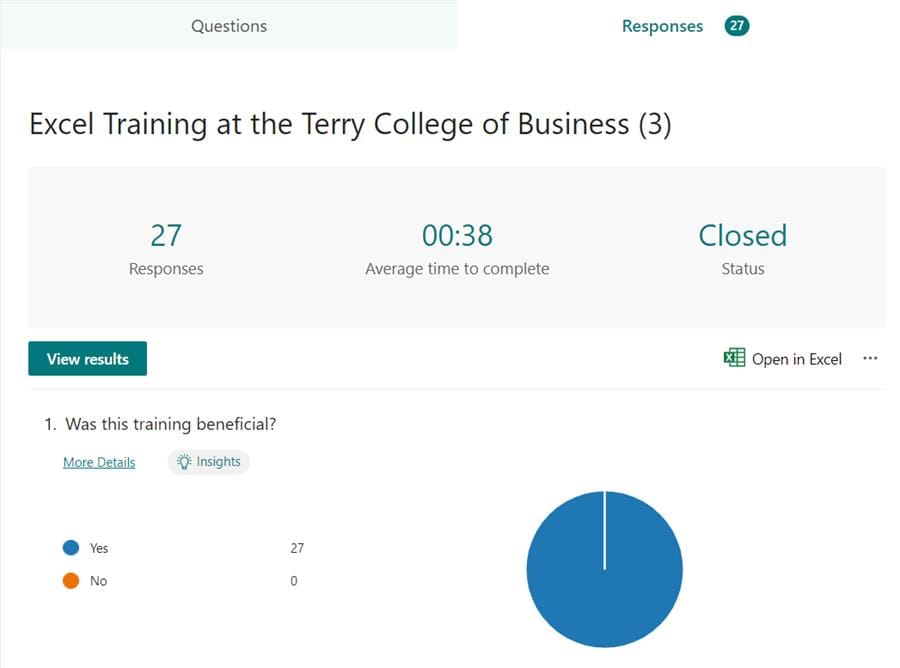
**Microsoft Forms - share responses**
You can always share the Excel file that contains all the responses, but you lose the charts automatically created by Forms. To share the summary data, including the charts, you can copy a sharing link. This link is different from the link to take the survey.
YouTube Video - share Forms Responses
Microsoft Forms - Share Responses for Surveys and Polls
Steps to share Forms responses
1. Open the Form 2. Click **Responses** 3. Click **More Options for Responses** 4. Click **Share a summary Link** 5. Copy the link 6. Share the link
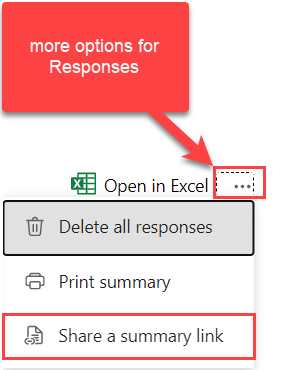
**Share a summary link in MS Forms**
How to stop sharing a Forms survey link
To stop sharing a link, use the same five steps to set up the link.
1. Open the Form 2. Click **Responses** 3. Click **More Options for Responses** 4. Click **Share a summary Link** 5. Copy the link 6. Share the link 7. Click the t **rash can** and then click **Remove Link**(see image below).
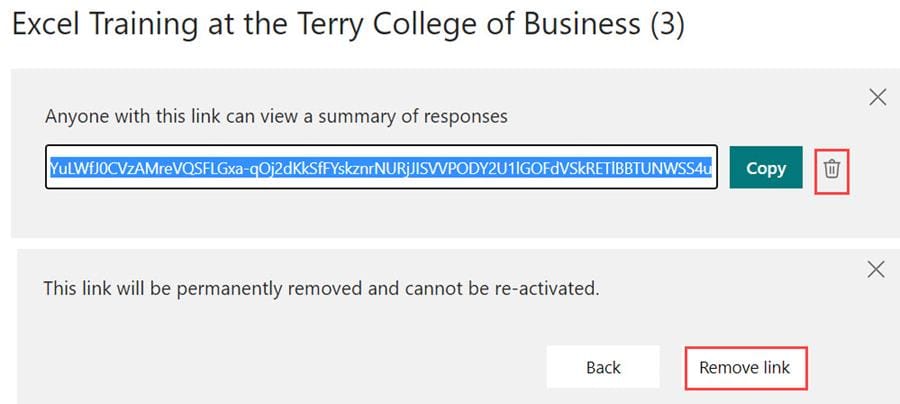
**MS Forms - Remove sharing link**



