
Microsoft 365 Copilot: Extracting Emails from Names

If you're a Microsoft 365 Copilot user, you're in for a treat. This tool offers a feature that can significantly streamline your workflow by turning a simple list of names into a comprehensive list of email addresses. In this article, we'll explore how to use Microsoft 365 Copilot to extract emails from names, a function that can save you valuable time and enhance productivity.
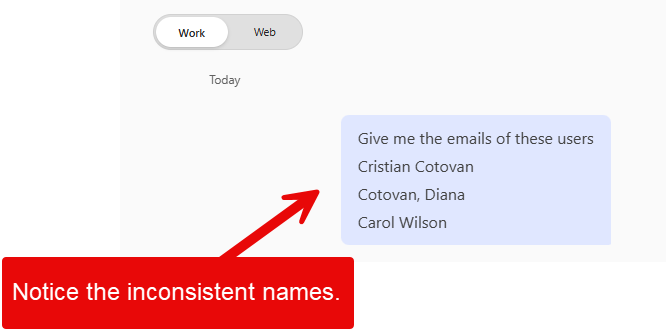
Inconsistent names to Email address with M365 Copilot
Dealing with Inconsistent Data Formats
One of the challenges we often face is receiving lists of names that aren't formatted consistently. You might have some names listed as "First Last" and others as "Last, First." This inconsistency can make it difficult to quickly gather the information you need, such as email addresses.
For instance, you might receive a list of names via email, Teams chat, or another method, and all you have are the names. You need to send emails to these individuals, perhaps to invite them to an event or enroll them in a learning management system. But without their email addresses, you're stuck.
YouTube Video
Get Users' Emails from Names: Microsoft 365 Copilot - YouTube
Using Copilot to Extract Emails
This is where Microsoft 365 Copilot comes in. With a Copilot license, you can use the tool to extract email addresses from a list of names with just a few clicks. Here's how:
1. Highlight the list of names you want to work with. 2. Open Microsoft 365 Copilot and navigate to the "Work" tab. This tab is essential because it accesses your work data securely. 3. Instruct Copilot to provide the email addresses for the highlighted names.
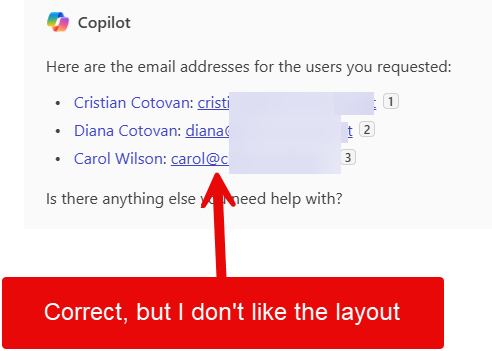
Copilot will then work its magic, accessing your work data and returning the email addresses you need. This process is efficient and secure, ensuring your information is protected.
Formatting Data with Copilot
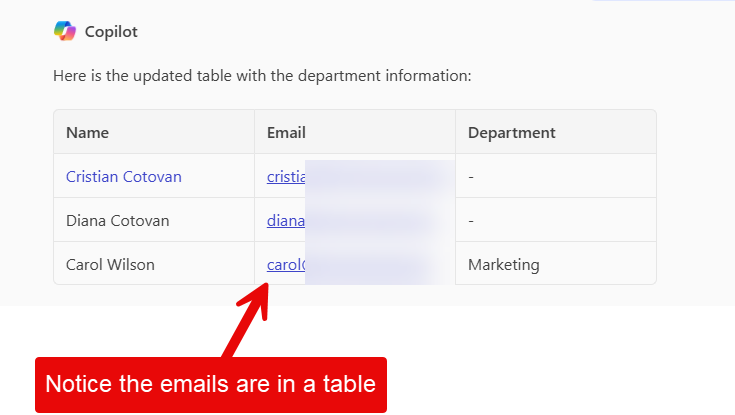
While Copilot can return email addresses, the initial format might not be the most user-friendly. Fortunately, you can ask Copilot to present the data in a more organized manner, such as a table. This is especially useful if you need to share the information with others or input it into another system.
To do this, simply request that Copilot provide the information in a table format. Copilot will then rearrange the data, ensuring that even inconsistent name formats are standardized into a consistent order. This feature not only saves time but also reduces the likelihood of errors.
The Benefits of Using Microsoft 365 Copilot
Using Microsoft 365 Copilot to extract emails from names provides several key benefits:
- Time Savings: Automating the extraction process saves significant time, especially when dealing with large lists. - Consistency: Copilot standardizes inconsistent data, reducing errors and improving data quality. - Flexibility: The ability to add additional information, like department details, makes your data more versatile. - Security: Copilot operates within your secure work environment, ensuring your data remains protected.



