
Many to One Mail Merge in Microsoft Word

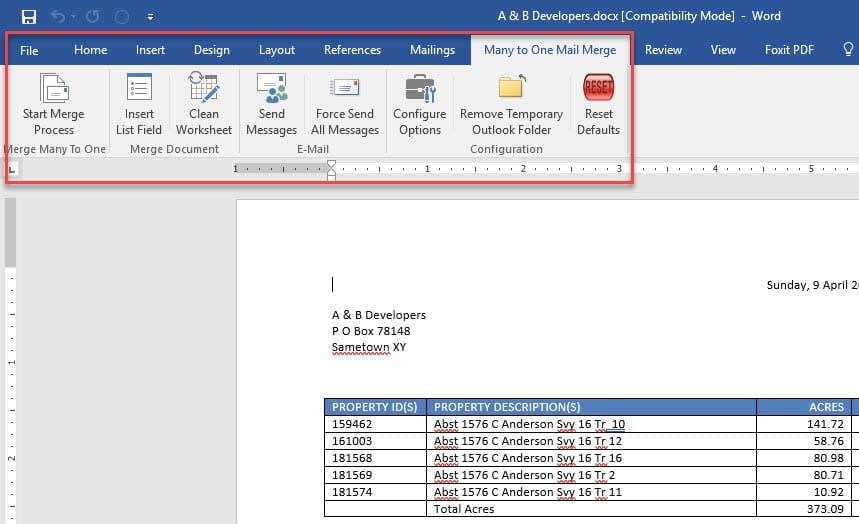
Microsoft Word performs a One to One mail merge by default. This means if you have five sales reps and each rep has 5 new potential leads, when you do a mail merge, each rep will receive five letters. That is 25 letters when ideally, you only want to send out five letters. Each rep getting one letter with their five 5 new leads on each letter.
Of my 250 videos on YouTube, two videos are dedicated to Many to One mail merge, which I refer to as Grouping Records. My two videos were created from Microsoft’s support article 294686.
Microsoft calls a Many to One mail merge “Create a list sorted by a Category” in the support article. Regardless of what you call this type of mail merge, the Microsoft article isn’t easy to do and leaves a lot to be desired even if you get it right.
Videos on Mail merge with grouping
My first video:
shows the mail merge working. It is only 3 minutes long.
The second video:
which is 10 minutes long, I walk you through article 294686. It shows me setting up my data file, setting up the directory, explaining the key field, and typing the fields. As mentioned, Microsoft does an awful job with grouping records in a mail merge.
This is where Graham Mayor’s Many to One Add-In for Word comes in handy. I tested it on April 9, 2017, and it worked! Not only did it work, it is easy to understand, and you don’t have to type in a lot of fields. Before actually testing the Add-in, I read Graham’s Many to One page twice. I need to point out, I only tested it for letters in Word, The Add-in also covers email mail merge, which I didn’t test. I can definitely see companies needing this Add-in.
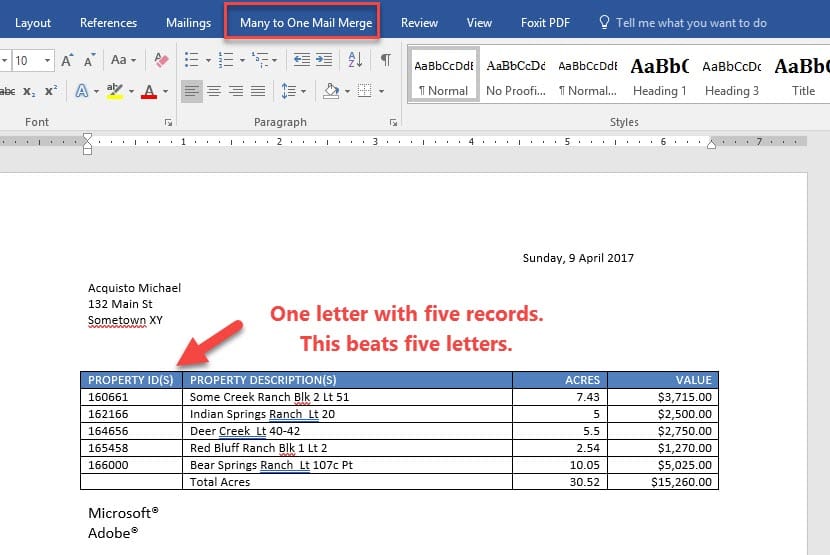
Video showing how to use Graham’s many to one merge add-in
Many to One Mail Merge in Word using Graham Mayor's Add-in by Chris Menard - YouTube



