
Import Excel into a Google Calendar

Import events to Google Calendar
You can transfer your events in Microsoft Excel to a Google Calendar. This will save you the time of retyping all the events.
Steps to save Excel as a CSV (Export)
Prior to saving an Excel file as a CSV, make certain you only have one worksheet in the Excel file.
1. In Excel, go to File > Save As. 2. The Save As dialog box appears. 3. Make the Save as type CSV. 4. Browse to the location where you want to save the CSV file. 5. Click OK. 6. Click Yes.

Steps to Import CSV into a Google Calendar
- Open Google Calendar.
- Point to the calendar you want to import data.
- Click the three vertical dots.
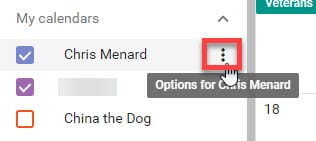
4. Click Setting and sharing.
5. Click Import & export. 6. Click Import.
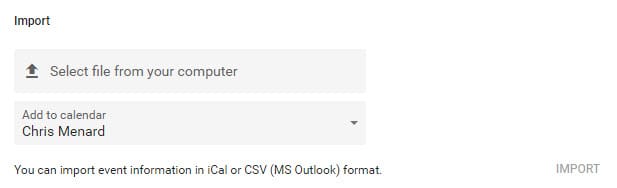
7. Select the CSV file from your computer.
8. Choose which calendar you will add the imported fields.
9. Click Import.
YouTube Video
How to import Excel into Google Calendar by Chris Menard - YouTube



