
How to use the Subtotal Function with Filters in Excel


We love to use Filters in Excel. When filtering data, the filtered rows turn blue. To get the SUM, AVERAGE, MAX, MIN, or COUNT of the filtered data, use the SUBTOTAL function.
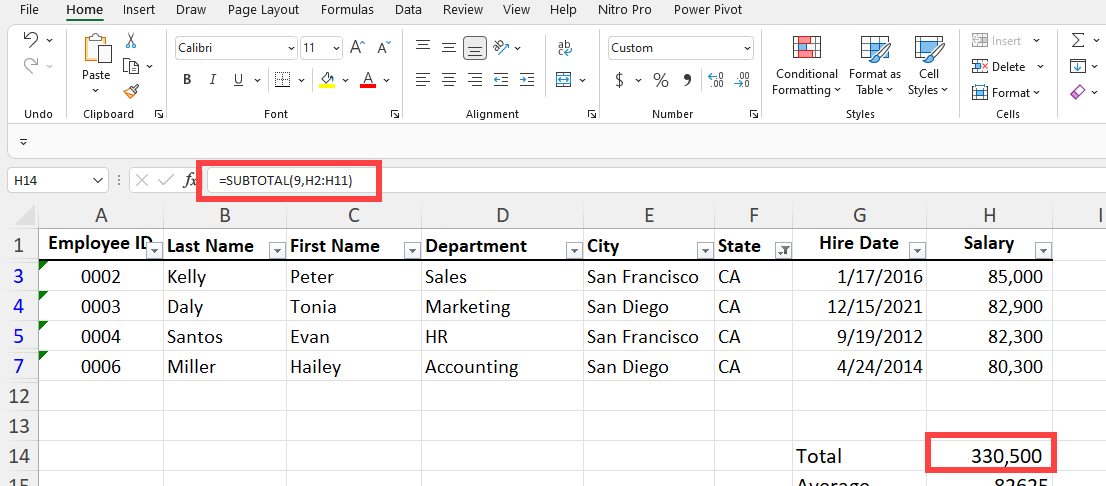
Subtotal Function in Excel
If you use one of the functions with one argument - SUM, AVERAGE, MAX, MIN, or COUNT - you'll end up with the incorrect answer. For example, when filtering data and you want the highest value, the MAX function is incorrect. You want to use =SUBTOTAL(4,cell range). You don't want the highest value if it is hidden. This is why you use the SUBTOTAL function.
YouTube video of the SUBTOTAL function
Excel - How to use the Subtotal Function with Filters
SUBTOTAL function groups
The SUBTOTAL function has two groups. Group 1 is 1 through 11, and Group 2 is 101 to 111. The SUBTOTAL function can return hidden or ignore hidden values, but it doesn't matter which group you use when used with Filters. The first group, 1 to 11, will include hidden, and 101 to 111 will ignore hidden. But as mentioned, with filtered data, it doesn't matter which group is used.



