
How to quickly delete empty folders in Windows 10

I find it aggravating when I click on a folder and there is nothing in it. If you have a lot of empty folders and want to delete them all at one time, here is an easy way.
[Download this zip file](https://chrismenardtraining.com/Files/DownloadFile.aspx?FUID=7aa2840f-742b-4376-818a-f4212eeb4391) and extract the exe file named delempty.exe from it. I scanned it with both Windows Defender and Avast and it is virus free. I recommend you test first by creating three new folders on your desktop as I did in the video below.
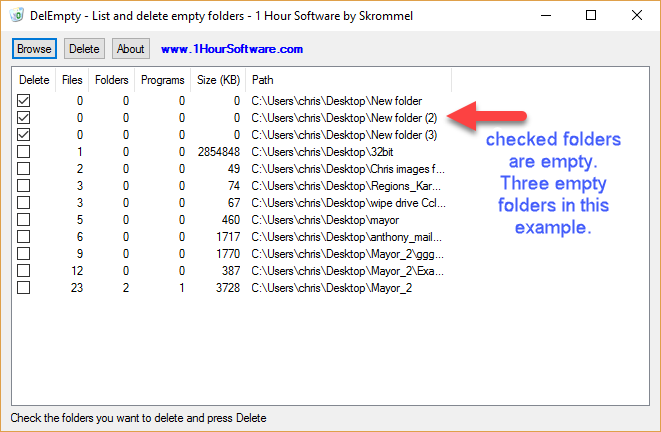
Double click delempty and click Browse.
Click your Desktop and click OK. delempty will show you the folders that are empty with a check mark. Folders with files will not be checked.
Now click Delete and click OK if you want to delete empty folders. They go to your recycle bin after deleting them.
Video on deleting empty folders with delempty.exe
Delete all empty folders in Windows 10 with delempty by Chris Menard - YouTube



