
Google Meet : How to blur background and view 49 participants


Google Meet has two new features that were just released in September. One of them is that you can blur your background and the second is that you can now view a maximum of 49 people in your Google meeting.
In this article we're gonna take a look at these two features.
So if I am in a meeting, and I am at home and maybe in my living room I haven't folded some clothes or maybe got a couple cups laying out, it would be really handy (if I don't have a greenscreen behind me) to be able to blur my background for the participants.
To do that I just have to click the **more options** in the right corner on the three dots and **"Turn on background blur".**
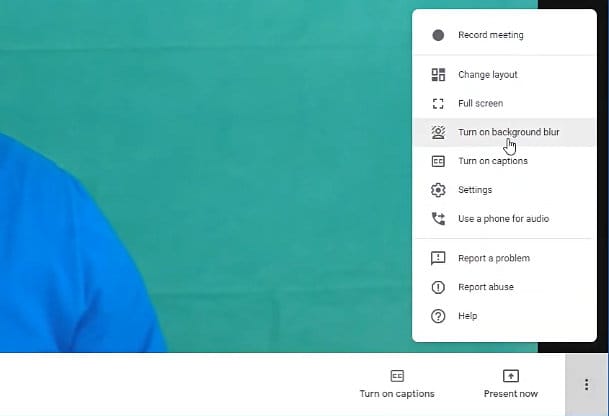
Notice that this feature is not on by default, so you can simply turn it **on** and **off** from that menu.
Another cool feature that is also not turned on by default is that you can now view a maximum of 49 people in your meeting.
To do that you have to open the **mode options dots** again and click on **change layout.**
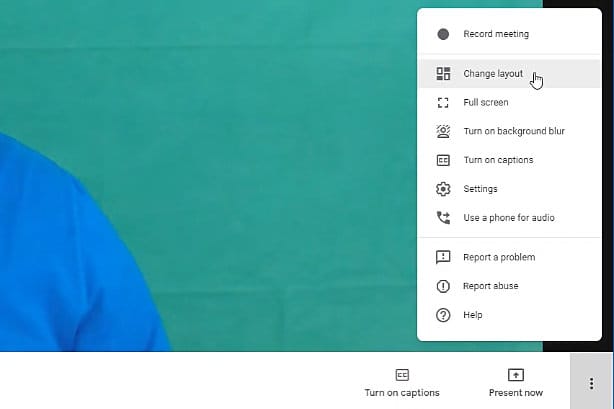
Notice that you've got an **auto** layout and you've got a **tiled** layout. By default the **auto** layout has nine people and the **tiled** has 16 people.
Just simply drag the slider over and there you go - there's 49 people right there.
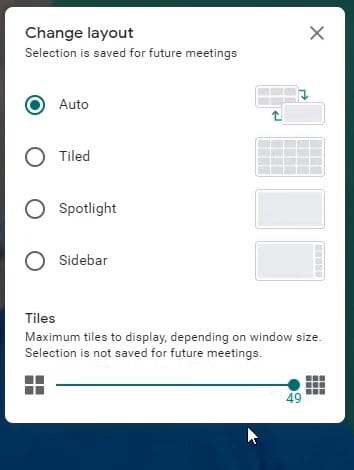
The slider works just the same for the **tiled** option, although it will **not** work for the **spotlight** and **sidebar** options.
You can watch these two new Google Meet features in my video here:
Google Meet - Blur Background and view 49 Participants



