
Gmail: Multiple signatures in Gmail using canned responses

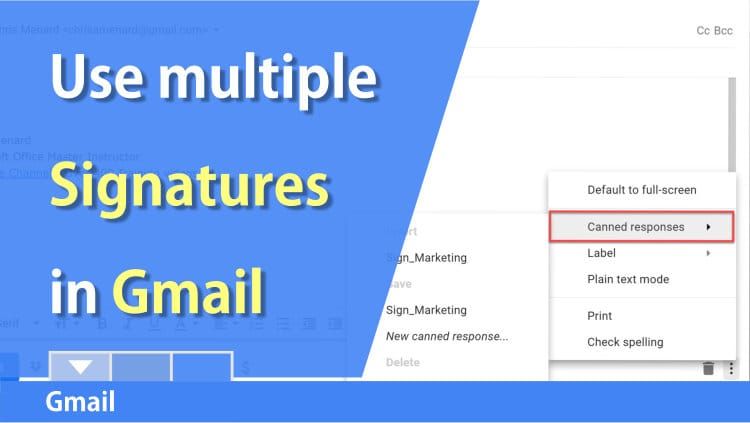
By default Gmail only has one signature for new emails and you can use the same signature for replies. Do you want to use multiple signatures? You can by turning on canned responses in Gmail.
We will use canned responses to have multiple signatures. Canned responses allow you to create new responses, override current responses and delete canned responses. Canned responses can be used for other template emails besides signatures.
To change your default signature in Gmail (desktop computer):
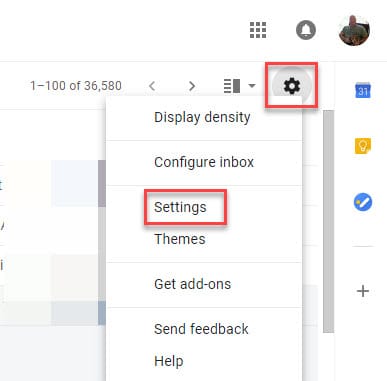
1. Sign-in to Gmail. Click **Setting**(the gear icon in the top right corner) - **Setting**- **General** tab in the top left.
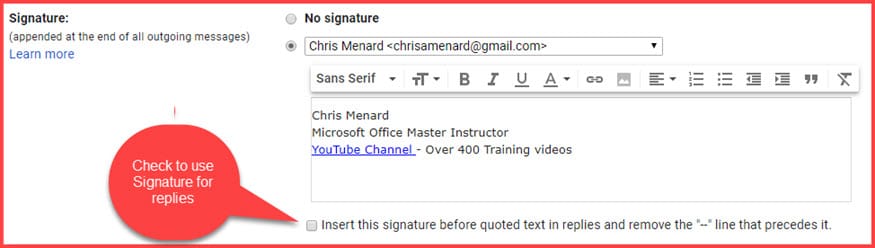
2. Add your signature. To make your signature work with replies, click Insert this signature before quoted text in replies...
3. Click **Save Changes** at the bottom of the screen.
To Enable Canned Responses
1. Click **Setting**- **Setting**\- **Advanced** tab. 2. **Enable** canned responses. 3. Click **Save Changes**.
To create a signature canned response
1. **Compose** a new email. 2. Type in your signature and format it. This should differ from the default signature. 3. Click **Canned Responses,** the three vertical dots **,** and select **New canned response**.
* * *
YouTube Video
Multiple signatures in Gmail using canned responses by Chris Menard - YouTube



