
Future Value Function in Excel

The Future Value function in Excel, or the FV function, will give you the future value on an investment. It is one of the financial function in Excel.
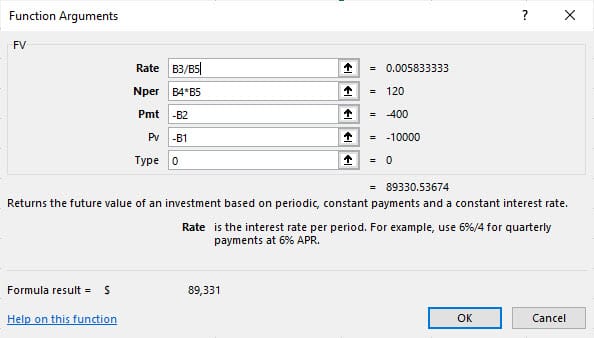
Future Value Function - arguments
The Future Value function has five arguments. Three of the five are required. Two arguments are optional.
**=FV (rate, nper, pmt, \[pv\], \[type\])**
- rate - The interest rate per period. If 12 months, divide the interest rate by 12. - nper - The total number of payment periods. If 12 months, multiply the periods by 12. - pmt - The payment made each period. Must be entered as a negative number. - pv - \[optional\] The present value of future payments. If omitted, assumed to be zero. Must be entered as a negative number. - type - \[optional\] When payments are due. 0 = end of period, 1 = beginning of period. The default is 0.
Example 1 of the Future Value: one-time investment
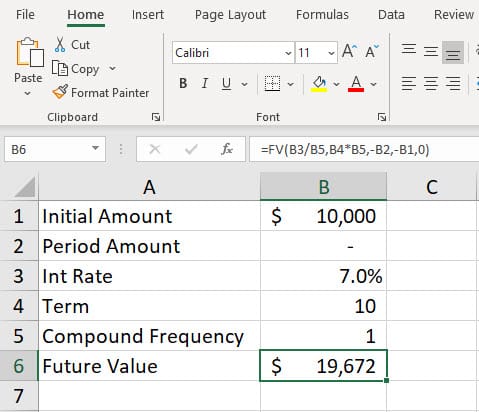
$10,000 invested at 7% interest for 10 years will be $19,672 in 10 years. Notice in this example, there are no peroidic payments. You invested the 10,000, and that is it.
Example 2 of the Future Value: one-time investment and periodic monthly investment
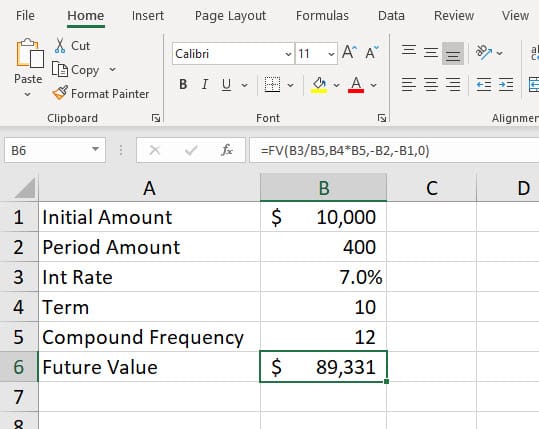
Similar to example 1, but now you are going to make the initial investment of $10,000, and you make regular investments of $400 every month at the end of the month. The interest rate is still 7%. Notice cell B5 is now 12 instead of the number 1. It is 12 since there are 12 months in a year, and you are investing $400 every month.
Future Value Function in Excel & Compound vs. Simple Interest explained by Chris Menard



