
Excel VLOOKUP for Tax Brackets Year 2021 with Examples


Use Excel to calculate your tax liability using VLOOKUP. The Excel file is in the blog post. Tax brackets show you the tax rate you will pay on each portion of your income. For example, if you are single in 2021 and make $86,375, you are in the 22% tax bracket. You do not pay $22% on your taxable income. Twenty-two percent of $86,375 is $19,002.50.
We have a progressive tax system in the United States. You would pay 10% tax on the first 9,950 you make. You will pay 12% on the next $30,575, and you will only pay 22% on the remaining $45,850. That totals $14,751. That is a huge difference from $19,002. We will use VLOOKUP in this Excel exercise to figure out your taxable income for 2021.
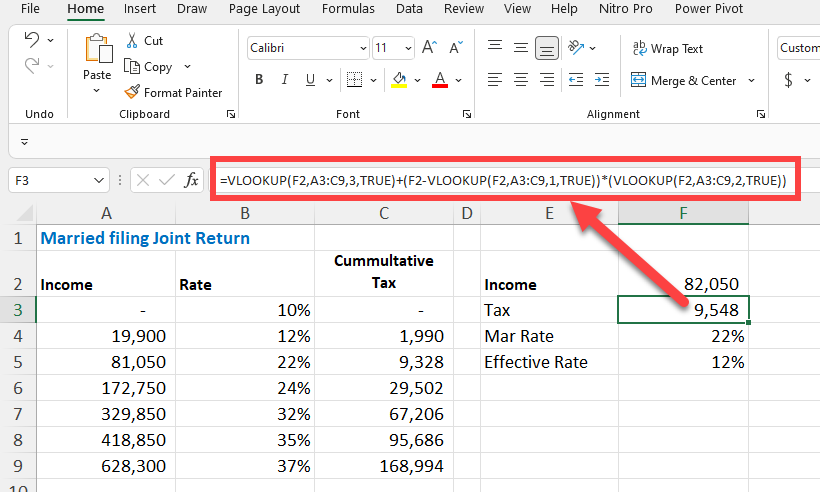
VLOOKUP - Tax Brackets - Taxable income
YouTube video
Excel VLOOKUP for Tax Brackets Year 2021 with Examples
Steps to figure out income tax due
- Add the header rows Income, Rate, and Cummultative Tax. - Fill in the numbers. The numbers come from the IRS, but you can find them on many websites. Make sure to put in your correct filing status numbers. Single and Married Filing a Joint Return have different numbers as an example. I'm using Married Filing a Joint Return in the example below.
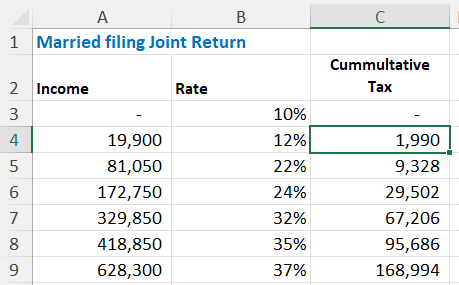
Cummulatative tax - IRS tax rates
- In columns E and F, put the Income, Tax, Marginal Tax Rate and Effective Rate. - F2 is your taxable income, not gross income, not adjusted gross income. Taxable income is after you take the Standard deduction or itemized deduction. - Cell F3 is the VLOOKUP Function **=VLOOKUP(F2,A3:C9,3,TRUE)+(F2-VLOOKUP(F2,A3:C9,1,TRUE))\*(VLOOKUP(F2,A3:C9,2,TRUE))** - Cell F4 calculates the Marginal Tax Rate also using the VLOOKUP function **=VLOOKUP(F2,A3:C9,2,TRUE)** - The Effective Tax rate in cell F5 is a formula **=F3/F2**
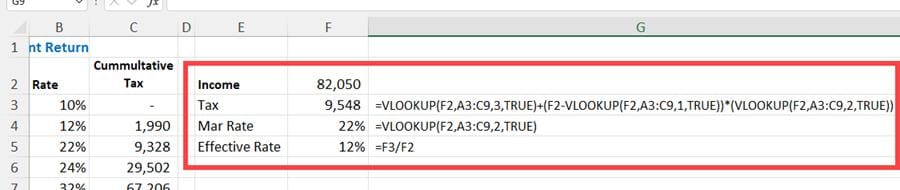
VLOOKUP in Excel for tax brackets



