
Excel - using the Scenario Manager to track house payments with skyrocketing mortgage rates


Updated: November 1, 2022
For potential homeowners, one year makes a HUGE difference. In 2021, we saw some of the lowest mortgage rates in the last 30 years. In July 2021, the average rate on 30-Year Fixed-Rate Mortgages was 2.87% (source FreddieMac). Today, November 1, 2022, we are looking at rates around 7.20% (source Bankrate). A $450,000 loan for 30 years is a difference in principal and interest of $1,189 a month.
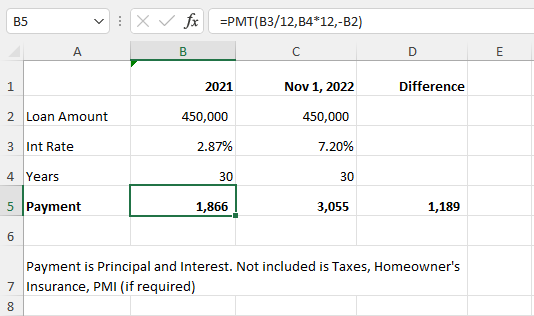
Interest Rates - 2021 vs. November 2022
Excel's Scenario Manager
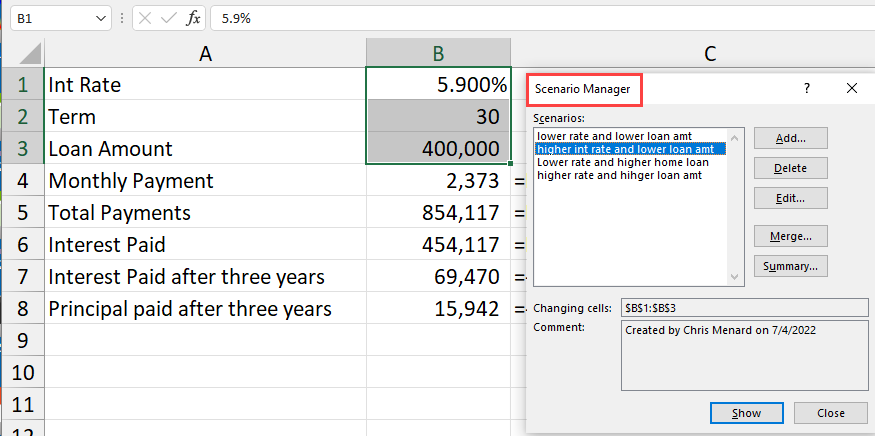
Scenario Manager in Excel
That is a significate spike. We will use Excel's Scenario Manager to review the changes in house payment (payment and interest) with mortgage rates for a 400,000 home and then a $550,000 home. Four scenarios will be created. We will also use several Excel functions including CUMIPMT and CUMPRINC to see how much interest and principal is paid over the first three years of the loan.
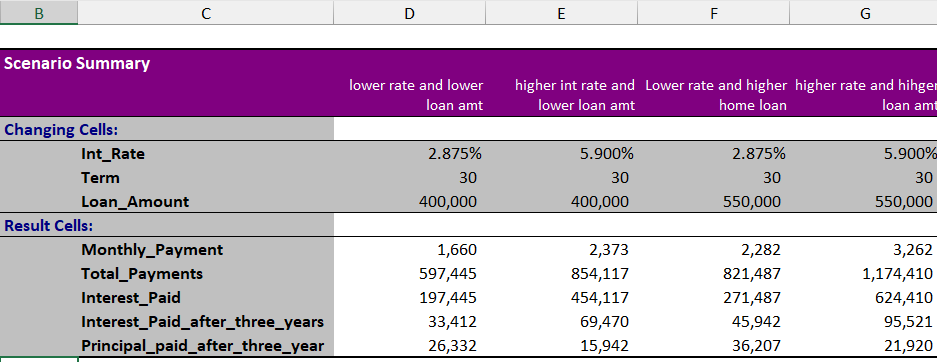
**Scenario Manager - Mortgage Rates for home**
_Columns D & E are comparing a 400K home at different rates_
_Columns F & G are comparing a 550K home at different rates_
In Excel, you have input cells and dependent cells. When creating scenarios you use the input cells. To generate a Scenario Report we use the dependent cells.
YouTube video - Scenario Manager
Excel - using the Scenario Manager to track house payments with skyrocketing mortgage rates.
Chapters:
- 00:00 Introduction - 01:04 Where I get my data - 02:07 Starting the project - 02:24 PMT - 04:00 CUMIPMT - 05:00 CUMPRINC - 05:43 Scenario Manager - 06:09 Naming the range - 06:51 Create scenarios - 08:57 Analyzing the scenarios - 10:32 Add scenarios to a new sheet - 11:42 Closing
CUMIPMT and CUMPRINC Functions in Excel
- CUMIPMT will return the cumulative interest paid on a loan between two periods. - CUMPRINC will return the cumulative priincipan paid on a loan between two periods.
Examples =-CUMIPMT(B1/12,B2\*12,B3,1,36,0) would be the cumulative interest between the 1 payment and the 36 payment of a home mortgage loan. The negative symbol makes the result a positive number.
Arguments
1. Rate - Required. The interest rate. 2. Nper - Required. The total number of payment periods. 3. PV - Required. The present value. 4. Start\_period - Required. The first period in the calculation. Payment periods are numbered beginning with 1. 5. End\_period - Required. The last period in the calculation. 6. Type - Required. The timing of the payment.
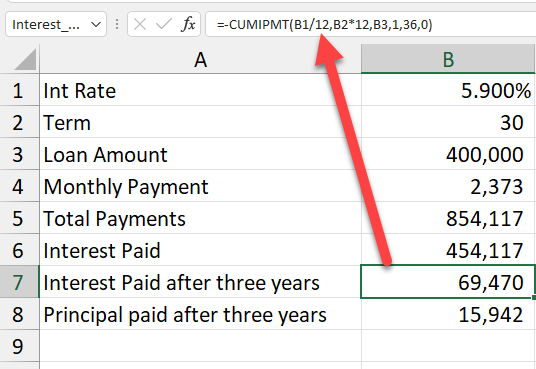
**CUMIPMT Function in Excel**
This function shows that $69,470 is paid in interest on a 400,000 loan at 5.90% interest in the first three years.



