
Excel Status Bar - Tips Every User Should Know: Chris Menard Training


The Status Bar in Excel is the area at the bottom of the windows that shows your zoom control in the right corner and Ready in the left corner.
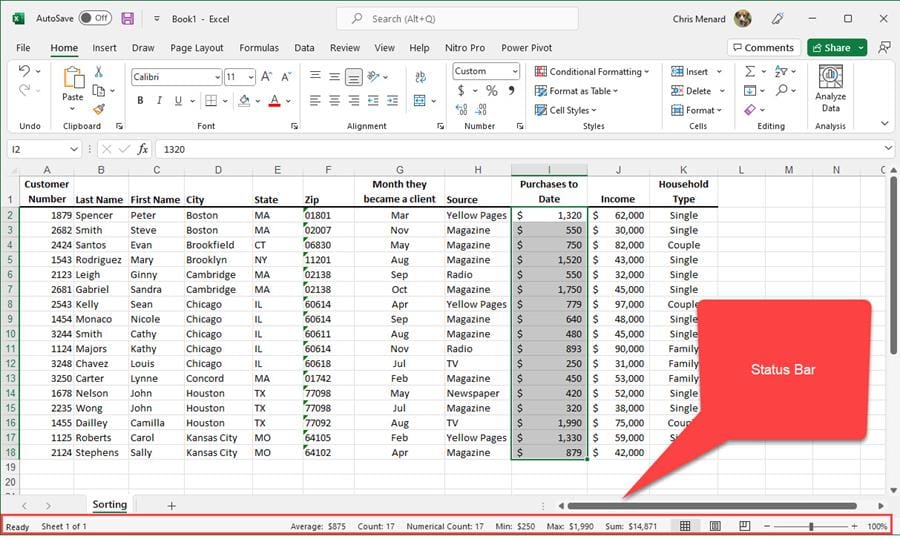
**Excel Status Bar**
The Status Bar show calculation such as Sum, Average, and Count. The number of worksheets can also be shown. Here is a screenshot of the status bar.
YouTube Video - Status Bar
Excel STATUS BAR - Tips Every User Should Know
Add functions to the Status Bar
There are six functions that can be shown in the status bar.
1. Average 2. Count 3. Numerical Count 4. Minimum 5. Maximum 6. Sum
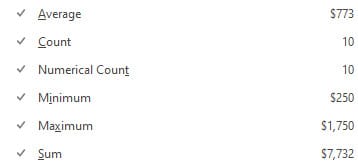
**Status Bar - Functions**
How to add functions to the Status Bar
To add functions to the Status Bar
1. Select a couple of cells with text or numbers. Right-click on the word COUNT or SUM in the lower right in the Status Bar. 2. When the Customize Status Bar menu appears, check Numerical Count, Minimum, and Maximum. There are a total of six functions that can be checked.



