
Excel SORTBY Function | Excel One Minute Quick Reference


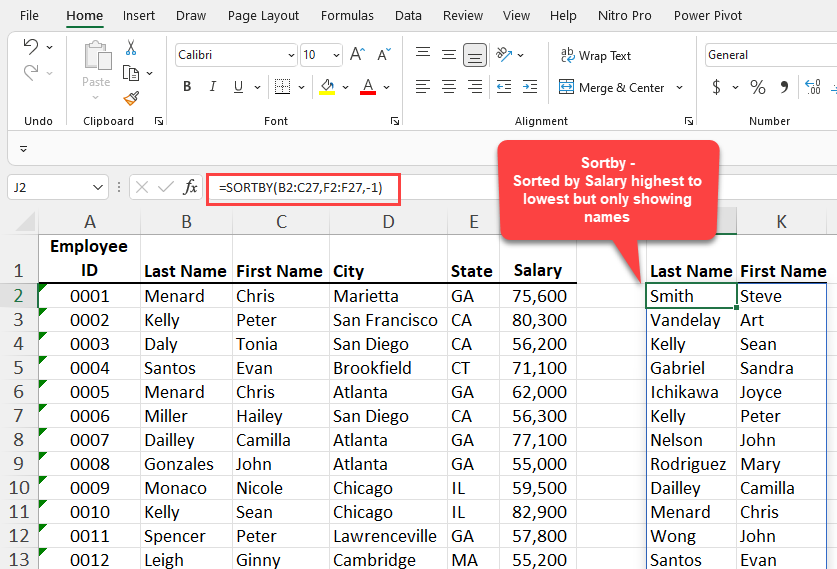
The SORTBY function in Excel sorts the contents of a range or array based on the values in a corresponding range or array. Use SORTBY to see a list of employees sorted by highest paid, but you don't show their salaries. USE SORTBY to sort a customer list by the most profitable customer but not see the revenue.
SORTBY has two required arguments, but you can sort by multiple criteria. You can use the SORTBY function on another worksheet or on another file or workbook.
SORTBY Function in Excel
YouTube video
Excel SORTBY Function | Excel One Minute Functions Explained
Syntax for SORTBY
=SORTBY(array, by\_array1, \[sort\_order1\], \[by\_array2, sort\_order2\],…)
Arguments for SORTBY
- array - The array or range to sort - Required - by\_array1 - The array or range to sort on - Required - \[sort\_order1\] - The order to use for sorting. 1 for ascending, -1 for descending. Default is ascending. - \[by\_array2\] - The array or range to sort on - \[sort\_order2\] - The order to use for sorting. 1 for ascending, -1 for descending. Default is ascending
Versions of Excel the SORTBY function works in
- Excel for Microsoft365 - Excel for Microsoft 365 for Mac - Excel for the web - Excel 2021 - Excel 2021 for Mac - Excel for iPad - Excel for iPhone - Excel for Android tablets - Excel for Android phones



