
Excel PivotTable - Table vs Range as Source - Which is better?

Share
Excel PivotTable - Table vs Range as Source - Which is better?


In Excel, a PivotTable can be based on a Range or on a Table. I encourage you to base your PivotTable on a Table.  Initially, both a range and table will be correct.
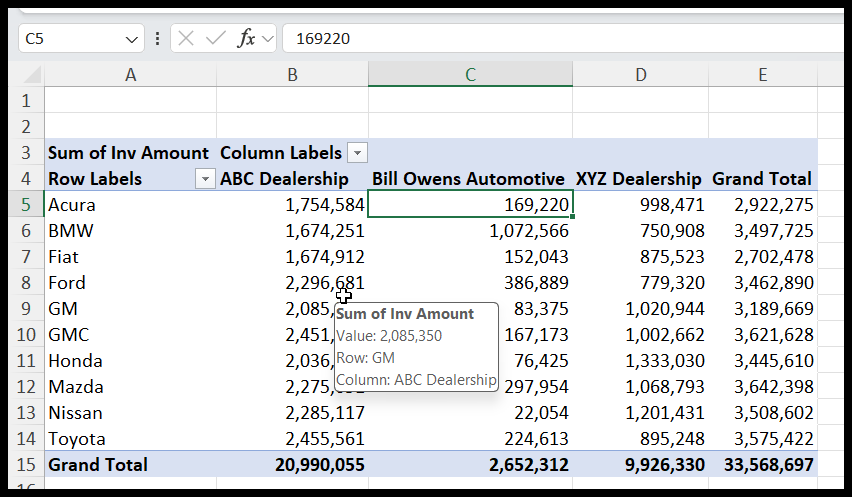
PivotTable -  Table vs. Range
PivotTable - Table vs. Range

The issue comes when you add data to the source and update or Refresh your PivotTable. If based on a table, the PivotTable updates automatically. If based on a Range, the PivotTable will not refresh, and you have to change your data source, which you may forget to do.
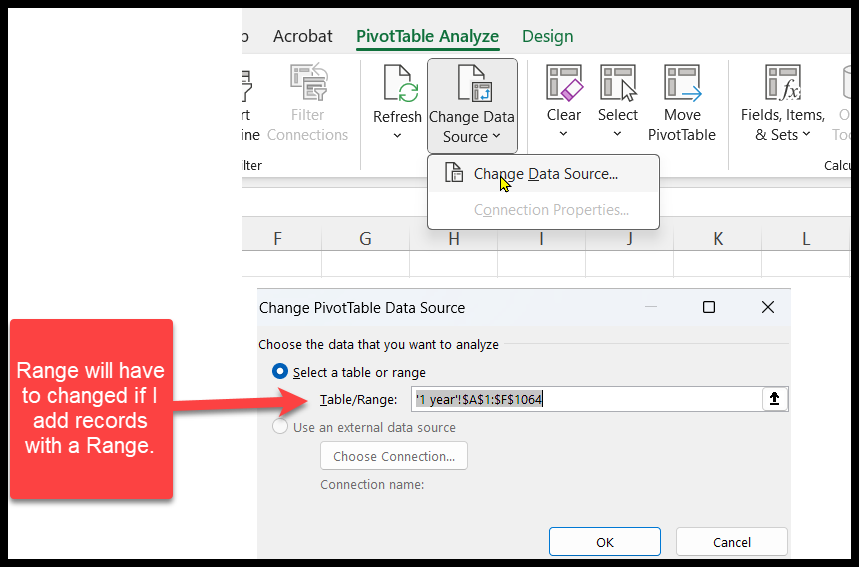
Issue with adding records when using a Range

Issue with adding records when using a Range

Keyboard Shortcut to create a Table
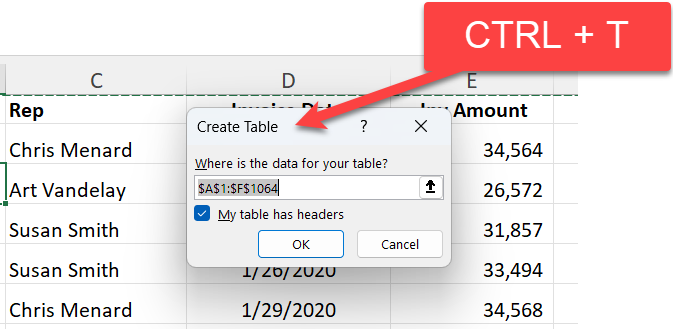
Create a Table in Excel - CTRL + T
Create a Table in Excel - **CTRL + T**

CTRL + T

Mouse method

  1. Click the Insert Tab
  2. Click Table in the Tables Group.

YouTube Video

Excel PivotTable - Table VS. Range as source - Which is better?

Read more

Copilot Skills in PowerPoint - Live Stream on October 20, 2026

Copilot Skills in PowerPoint - Live Stream on October 20, 2026

𝗠𝗼𝘀𝘁 𝗣𝗼𝘄𝗲𝗿𝗣𝗼𝗶𝗻𝘁 𝘂𝘀𝗲𝗿𝘀 𝗸𝗻𝗼𝘄 𝗖𝗼𝗽𝗶𝗹𝗼𝘁 𝗰𝗮𝗻 𝗰𝗿𝗲𝗮𝘁𝗲 𝘀𝗹𝗶𝗱𝗲𝘀. 𝗙𝗮𝗿 𝗳𝗲𝘄𝗲𝗿 𝗸𝗻𝗼𝘄 𝗮𝗯𝗼𝘂𝘁 𝘁𝗵𝗲 𝟴 𝗯𝘂𝗶𝗹𝘁-𝗶𝗻 𝗖𝗼𝗽𝗶𝗹𝗼𝘁 𝗦𝗸𝗶𝗹𝗹𝘀 𝘁𝗵𝗮𝘁 𝗰𝗮𝗻 𝗰𝗼𝗺𝗽𝗹𝗲𝘁𝗲𝗹𝘆 𝗰𝗵𝗮𝗻𝗴𝗲 𝗵𝗼𝘄 𝘆𝗼𝘂 𝗯𝘂𝗶𝗹𝗱, 𝗶𝗺𝗽𝗿𝗼𝘃𝗲, 𝗮𝗻𝗱 𝗽𝗿𝗲𝘀𝗲𝗻𝘁 𝗮 𝗱𝗲𝗰𝗸. Join me live on October 20, 2026, at Noon Eastern as I demonstrate each Copilot Skill and show practical ways to use them in your presentations. PDF of the 8 Copilot Skills in Pow

By Chris Menard


