
Excel LARGE function | Find the second, third, n-th largest value | Excel One-Minute Quick Reference


The LARGE function in Excel returns the k-th largest value in a data set. For example, you can use LARGE to return the customer with the highest revenue, 2nd highest revenue, third-highest revenue, and so on.
Another example is to use the LARGE function to see the highest test score, 2nd highest test score, and the third-highest test score. The large function has two arguments. Both arguments are required.
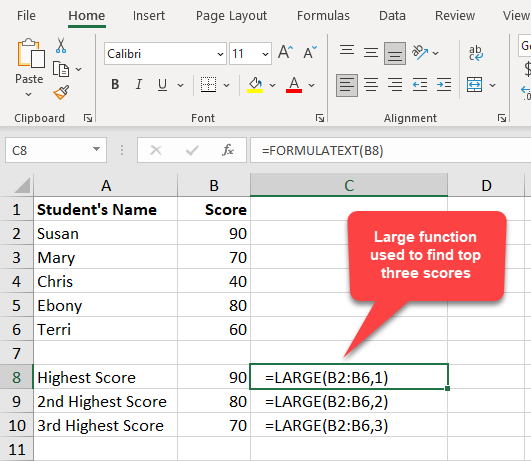
LARGE function - 3 highest scores
Syntax of the LARGE function
**LARGE(array, k)**
The LARGE function syntax has the following arguments:
- Array - Required. The array or range of data for which you want to determine the k-th largest value. - K - Required. The position (from the largest) in the array or cell range of data to return.
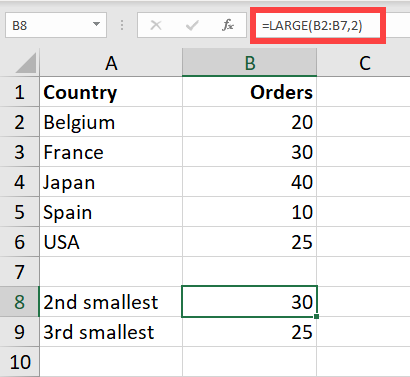
LARGE function finding the 2nd largest value
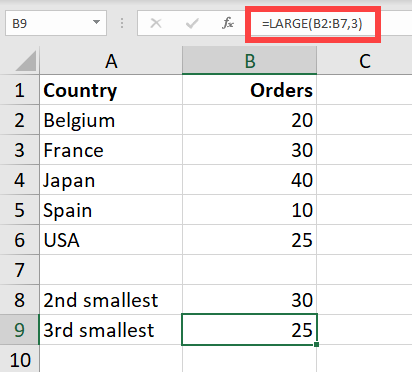
LARGE function finding the 3rd largest value
What about duplicate values with the LARGE Function?
With duplicate values, LARGE will return the duplicate value multiple times. For example, the numbers 10, 8, 8, and 4.
- Large 1 will be 10. - Large 2 will be 8 - Large 3 will be 8 again since 8 is in the data list twice. - Large 4 will return 4
The way to get around this is using the MAX function with the IF Function as an array function.
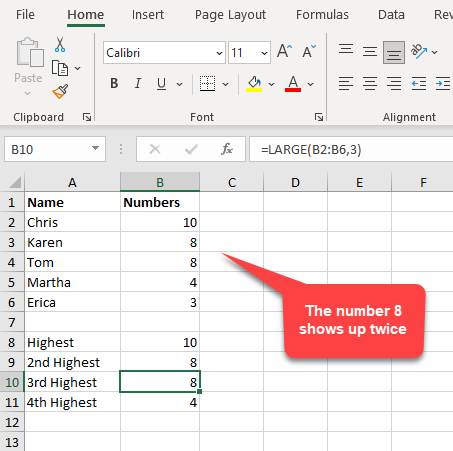
LARGE Function with duplicate numbers
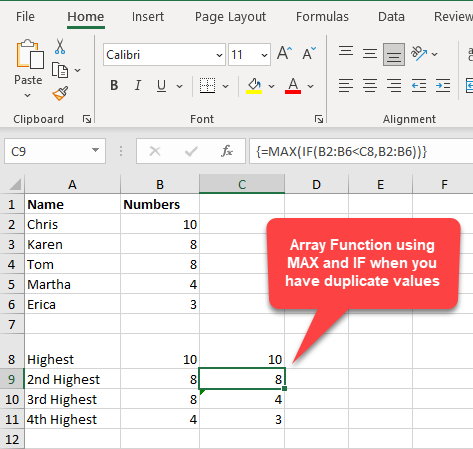
MAX and IF Function - array function
YouTube video
Excel LARGE function | Find the second, third largest value | Excel One Minute Quick Reference
Finding these tutorials useful? I have hundreds more tutorials for Google-related products, Microsoft Office, Zoom, Microsoft Teams and more, on [my YouTube Channel](https://chrismenardtraining.com/youtube). See you there?



