
Excel Import Data from the Web


Excel allows you to pull data on a webpage into Excel. This is a great time-saving feature. Getting data from a webpage is done in Excel on the Data Tab using Get and Transform Data group, From Web command.
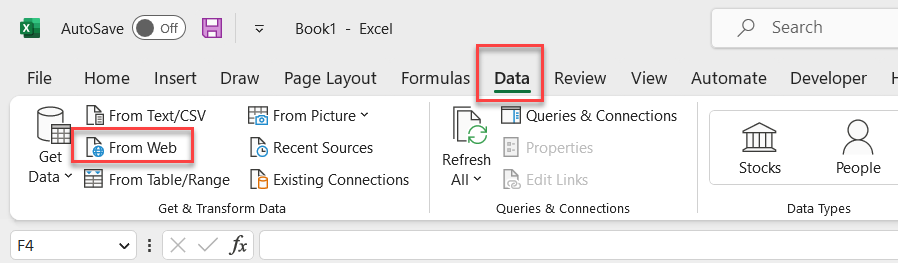
**Excel - Data From Web**
Get Started
- Find a webpage with Tables on it. **Copy** the URL. - Go to Excel and click the **Data** tab. - Click **From Web**. - **Paste** the webpage URL (screen shot below) - Click **OK**.

**Paste webpage URL**
- The tables on the webpage will appear. Click the table you want to pull into Excel. You get a preview of the data. - Click **Load** or you can use Power Query to clean the data.
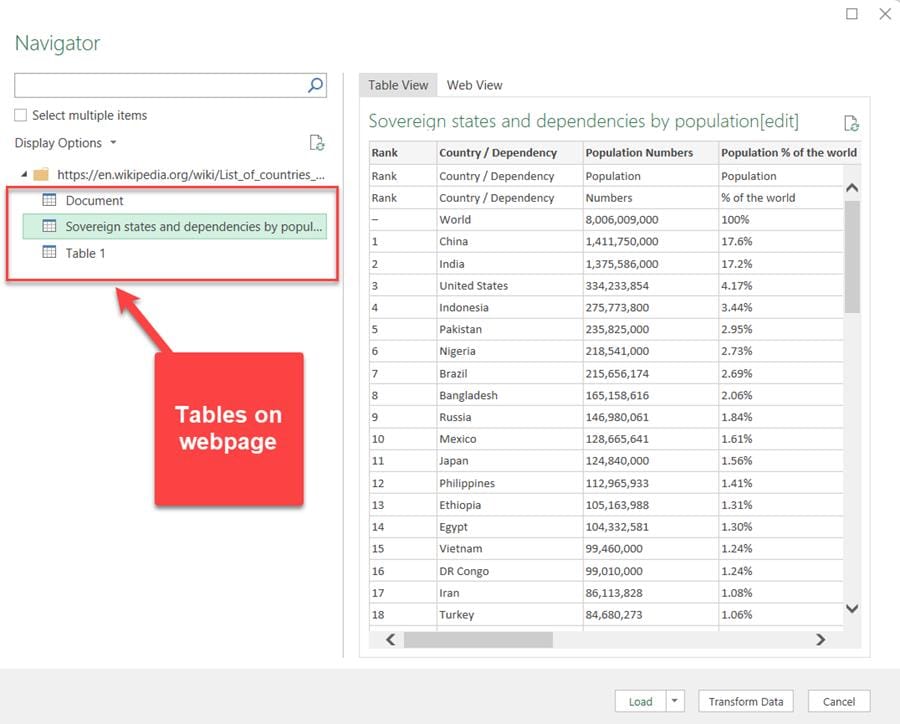
**Tables found on the webpage**
YouTube Video
Excel Import Data from the Web - Great Time Saving Feature



