
Excel DATEDIF Function | Excel One Minute Quick Reference


Need to know the number of years, months, or days between two dates? Excel's DATEDIF function will calculate it for you. This is a great function if you work in Human Resources (HR), or any job position where you need the difference in dates. I also use the TODAY function - which I recently covered in two videos and mixed and absolute reference.
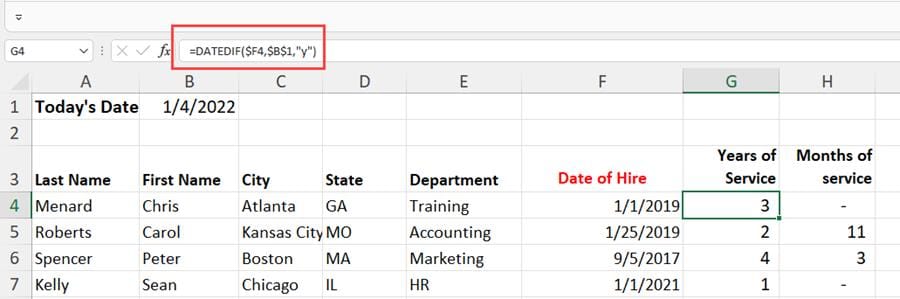
DATEDIF - find years, months, and days between two dates
YouTube Video
Excel DATEDIF Function | Excel One Minute Functions Explained
Syntax for DATEDIF
=DATEDIF(start\_date,end\_date,unit)
Units in DATEDIF
| | | | --- | --- | | **UNIT** | **Description** | | Y | The number of complete years in the period. | | M | The number of complete months in the period. | | D | The number of days in the period. | | MD | The difference between the days in start\_date and end\_date. The months and years of the dates are ignored. | | YM | The difference between the months in start\_date and end\_date. The days and years of the dates are ignored. |
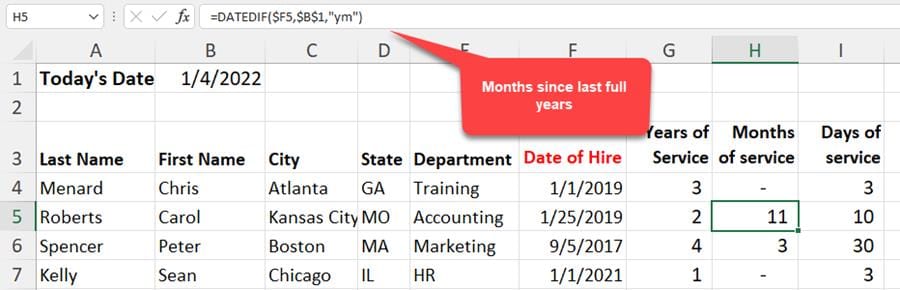
DATEDIF Units - **YM** is used in this example|



