
Excel: Covert decimal hours Excel's hours & minutes (8.25 to 8:15)


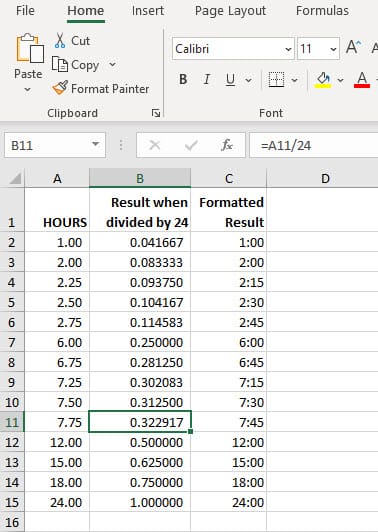
I'm frequently asked how to convert decimal hours to Excel's hour and minute format. A couple of examples: 7.75 need to show as 7:45, and 30.25 needs to show as 30:15. The solution is to divide by 24 hours. The formula is **=hours/24**. When you divide 7.75 by 24, you get 0.322917. After getting the answer, you format the time with an hour and minute format using Format Cells in Excel. The format is **h:mm** This works since one day (1) is 24 hours. 12 hours divided by 24 is 0.50.
YouTube Video
Excel: Covert decimal hours Excel's hours & minutes (8.25 to 8:15)
What about durations over 24 hours?
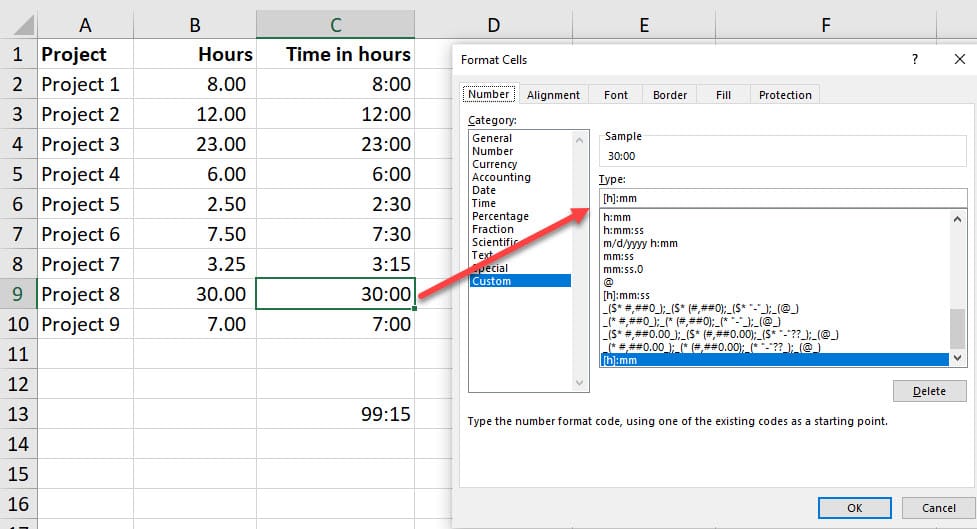
To display hours over 24 hours, recall I mentioned 30.25? Just adjust the number format. Just wrap the hours, which is the letter h in square brackets **\[h\]:mm**
How do I convert to minutes?
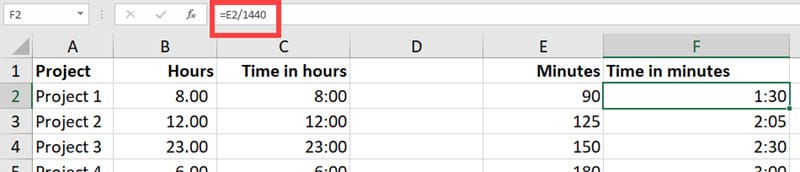
To convert to minutes, divide by 1440 instead of 24. 24 hours x 60 minutes = 1,440.
Excel file used in the video
[One Excel file](https://chrismenardtraining.com/Files/DownloadFile.aspx?FUID=4d3d54a0-e3c0-4b0f-a22e-f2b0d0541df4)



