
Excel COUNTIF Function With Wildcard Search and Cell Reference: Chris Menard Training


The COUNTIF function in Excel allows you to only count the number of cells that meet certain criterion. For example, the number of cells that the HR department appears in. With COUNTIF, you can do a wildcard search by using \* (asterisk).
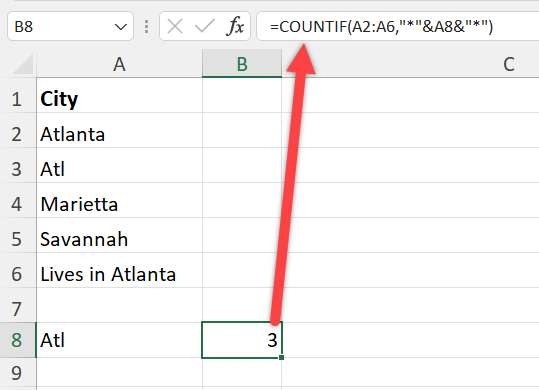
**COUNTIF with wildcard search and cell reference**
The asterisk looks for any number of characters. For example, \*east finds "Northeast" and "Southeast". With COUNTIF you can reference a cell also. The issue comes up with using a wildcard search with a cell reference. To accomplish this, we will use CONCATENATE or & with the cell reference.
YouTube Video on COUNTIF with Wilcard Search
Excel COUNTIF Function With Wildcard Search and Cell Reference
Chapters
- 0:00 Intro - 0:15 COUNTIF explained - 1:05 COUNTIF with wildcard - 1:56 COUNTIF with cell reference wildcard
COUNTIF Function
COUNTIF Function has two required arguments. The criteria is not case-sensitive. All caps or lowercase or mixed - it doesn't matter.
=countif(b2:b25,"HR") will count HR in cells B2 through B25. If cell B4 reads "HR Department" without the quotes, it could not be counted.
=countif(b2:b25,"\*atl\*") will count ATL in cells B2 through B25. If cell B4 read "Lives in ATL" without the quotes, it would be counted since we have wildcard before and after atl.|



