
Excel Conditional Formatting with the TODAY function | Duplicate Rule


The TODAY function is one of my favorite Date & Time functions in Excel. It returns the current date and will automatically update. We will use the TODAY function with Conditional Formatting and create three rules on a date field.
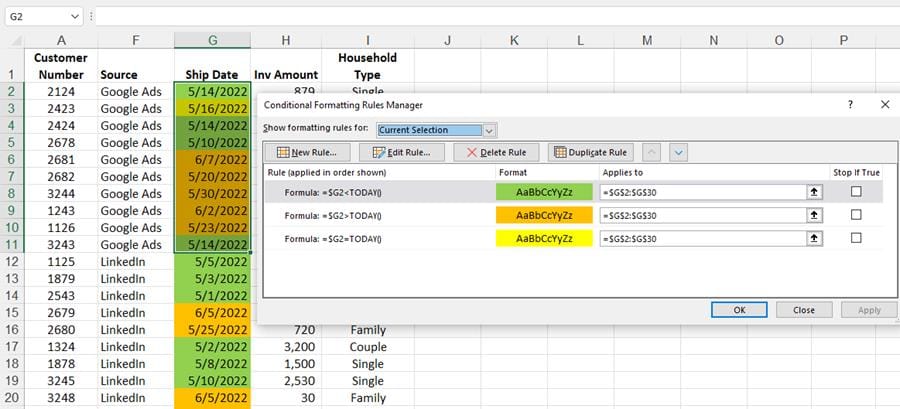
Excel Conditional Formatting with the Today Function
The date field can be any date field - order date, invoice date, request date, etc. I used the ship date in my example. If the cell's date equals the current date, we will put that one color, any dates less than today's date in another color, and dates greater than today in a third color.
Conditional formatting is located on the Home tab. After writing the first rule, =$G2=TODAY(), I copied the rules to create the other two rules. Here is a screenshot of all three rules.
YouTube Video - Conditional Formatting with the TODAY Function
Excel Conditional Formatting with the TODAY function | Duplicate Rule
Chapters/Bookmarks
- 0:00 Intro - 0:26 Ship date - 0:44 Rule 1 - $G2=TODAY() - 1:47 Mixed Reference - 3:57 Rule 2 - Duplicate rule - 4:47 Rule 3 - 5:20 Resize Conditional Formatting
TODAY Function
=TODAY() The TODAY function has no arguments and will return the current date. When the file is open again, the date will automatically update.It is a great Date & Time Function.
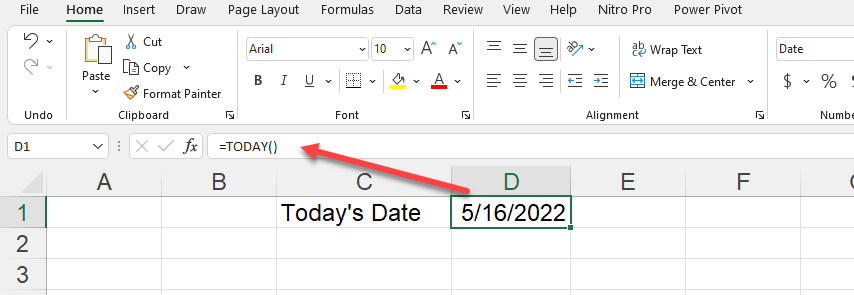
TODAY function in Excel
Conditional Formatting Rules
Three rules:
1. Greater Than 2. Less Than 3. Equal To
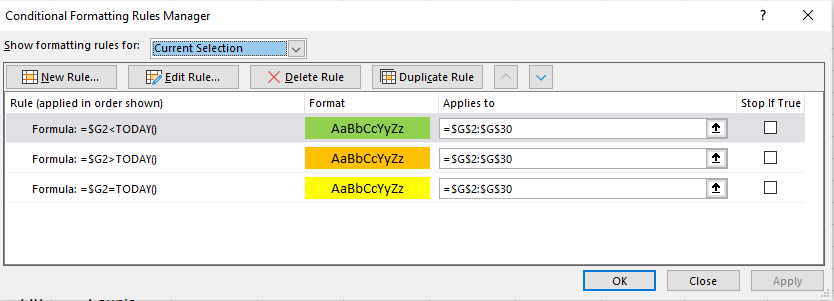
Three conditional formatting rules



