
Creating Secure Passwords

PASSWORD RULES TO FOLLOW:
For some reason people have a hard time creating secure passwords. The most likely reason is our brains aren’t wired to handle this much detailed information. In 2015, the average number of passwords per person was 90. I find that number to be on the low side. I personally have over 400 passwords.
Let me get back to the issue of creating a secure password.
**Passwords should be:**
1. At least 16 characters. 2. Contain a combination of numbers, symbols, uppercase letters, lowercase letters. 3. Free of repetition, dictionary words, usernames, pronouns, IDs, and any other predefined number or letter sequences. 4. Don’t use the same password for every account.
**Examples of good passwords:**
- Rp5#3@xQ\*ZkT@F2!cWu - Wz$29$zbWrd!#975pUxQ
Examples of bad passwords (people actually use these passwords):
- 123456 - password - ginger - sunshine - seinfeld - 12345678 - qwerty - football - baseball - welcome - abc123 - dragon - master - princess - starwars
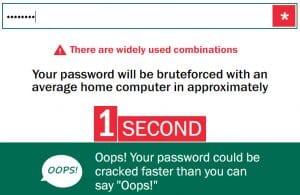
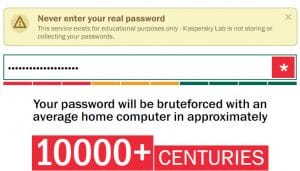
The website to see how secure your password is [password.kaspersky.com](https://password.kaspersky.com/) If you use the site to test your password, don’t type in your real password. I tested one of my Gmail passwords, but changed a few numbers and changed the special characters. Results below.
My rule about passwords is this. If you can remember it easily, it’s probably a bad password.



