
Calculated Items in an Excel PivotTable

Excel PivotTables have calculated fields and calculated items. In this video, I will take a field called Year, which has 2022 and 2021 in it and create a calculated item. In case you are wondering, what is the difference between a calculated field and a calculated item? That is easy to explain. Your data has a header row that contains fields. The items in the field are items.
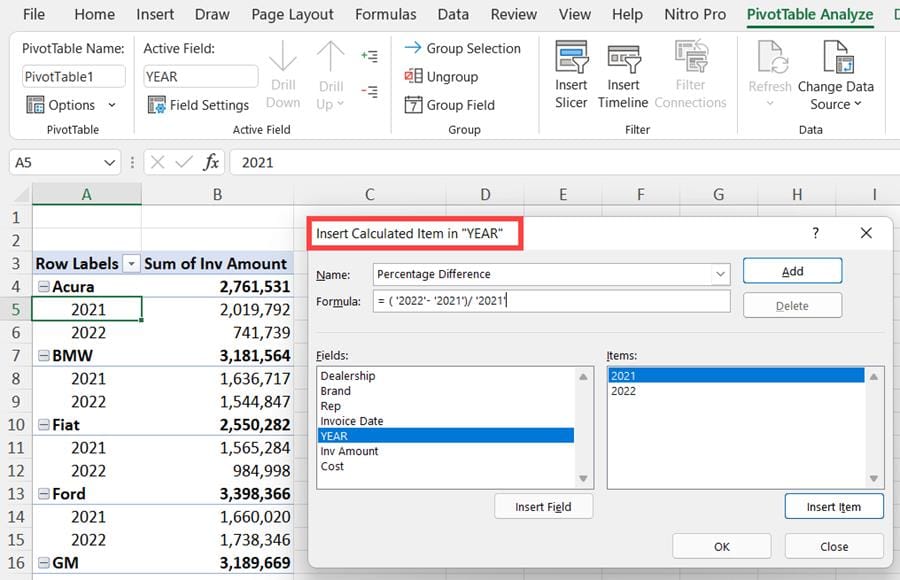
**Excel - Calculated Item**
YouTube Video
Excel Advanced - Calculated Items in a PivotTable - using percentages
Video Chapters
- 0:00 Introduction - 0:17 Calculated field and items explained - 1:26 Insert Pivot Table - 2:25 Number format - 2:57 Calculated Item - 4:42 Add percentages - TIP
Example of a Calculated Item
If you were tracking employees, you could have a field called Department. Listed below department is Accounting, Marketing, Sales, Customer Service. Those four are items, but the department is the field.



