
Calculate difference in time in Microsoft Excel

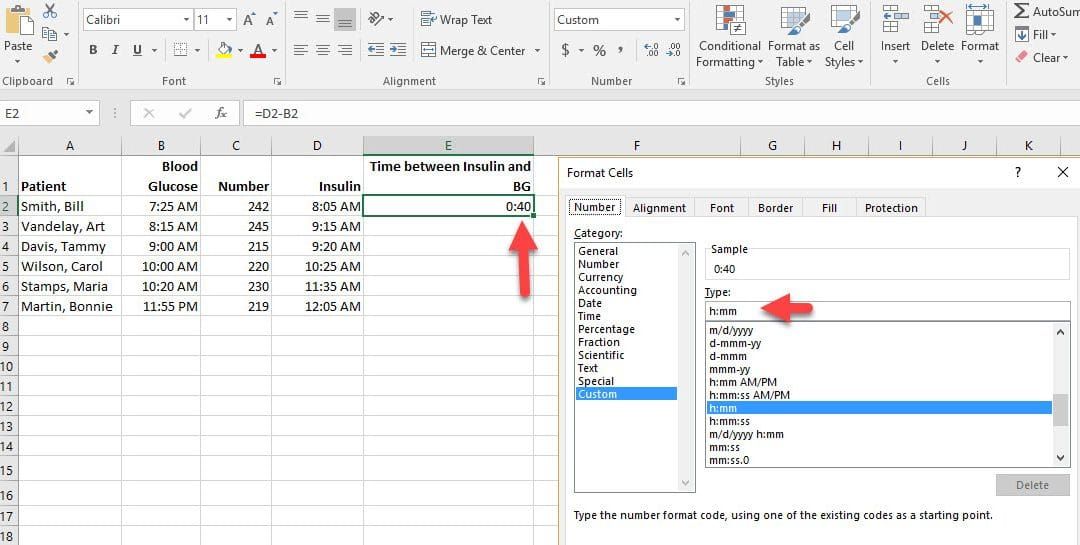
Let’s say that you want to find out how long it takes for an employee to complete an assembly line operation or a nurse to give insulin after a blood glucose test, or a fast food order to be processed at peak hours. There are several ways to calculate the difference between two times.
One of the easiest methods is to subtract one time from another and format the result as h:mm. When you do this your answer may show AM or PM. To correct this mistake:
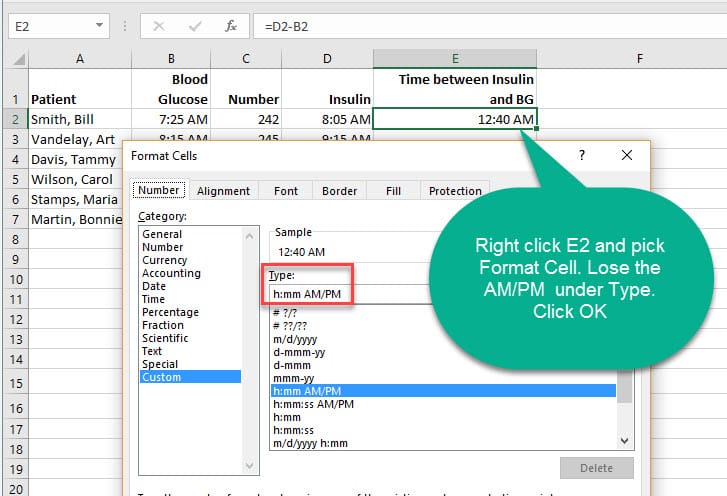
1. Simply right click the cell. 2. Click **Format Cells**. 3. Make sure you are on **Custom**. Click in the **Type** box and remove the AM/PM. See the red rectangle below. 4. Click OK.
See the screenshot below.
Excel – YouTube video – calculate the difference in time
YouTube video below shows how to calculate the difference in time from two cells with time in them. Example: 4:25 pm – 1:18 pm. If you go over midnight (11pm to 3am), you will end up with a lot of pound symbols. Widening the column won’t help with the pound symbols. You have to write an IF Statement which is also shown in the video.
Excel - calculate difference in time across midnight by Chris Menard on YouTube
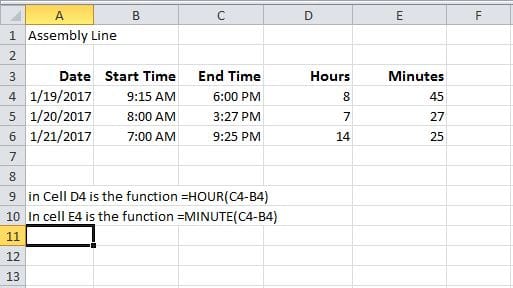
Use HOUR and MINUTE Function in Excel
Finally, you should know that you can use the Hour and Minute Functions in Excel.
- =HOUR(B2-A2) will show the difference in the hours unit between two times. This value cannot exceed 24 hours.
- =MINUTE(B2-A2) will show the difference in the minutes unit between two times. This value cannot exceed 60 minutes.
Put in current date in Excel
1. The current date in Excel. just use **CTRL + ;** 2. The current time is **CTRL + SHIFT + ;**
Both are static and will not change automatically.
Put in current date in Excel and it updates automatically
To put in the current date in Excel and have it automatically update the date when you open the file use **=TODAY()** function.



